> ## Documentation Index
> Fetch the complete documentation index at: https://docs.anymorph.ai/llms.txt
> Use this file to discover all available pages before exploring further.
# Citation
> See which web pages and domains AI engines actually pull from when they answer questions in your category.
This screen shows the source links attached to AI answers: which pages AI leans on, who owns them, and what kind of pages they are. Open it when you need to decide where to publish or get placed next. In the sidebar it sits under **Analyze** as **Citation**; the screen itself is titled **Citations**.
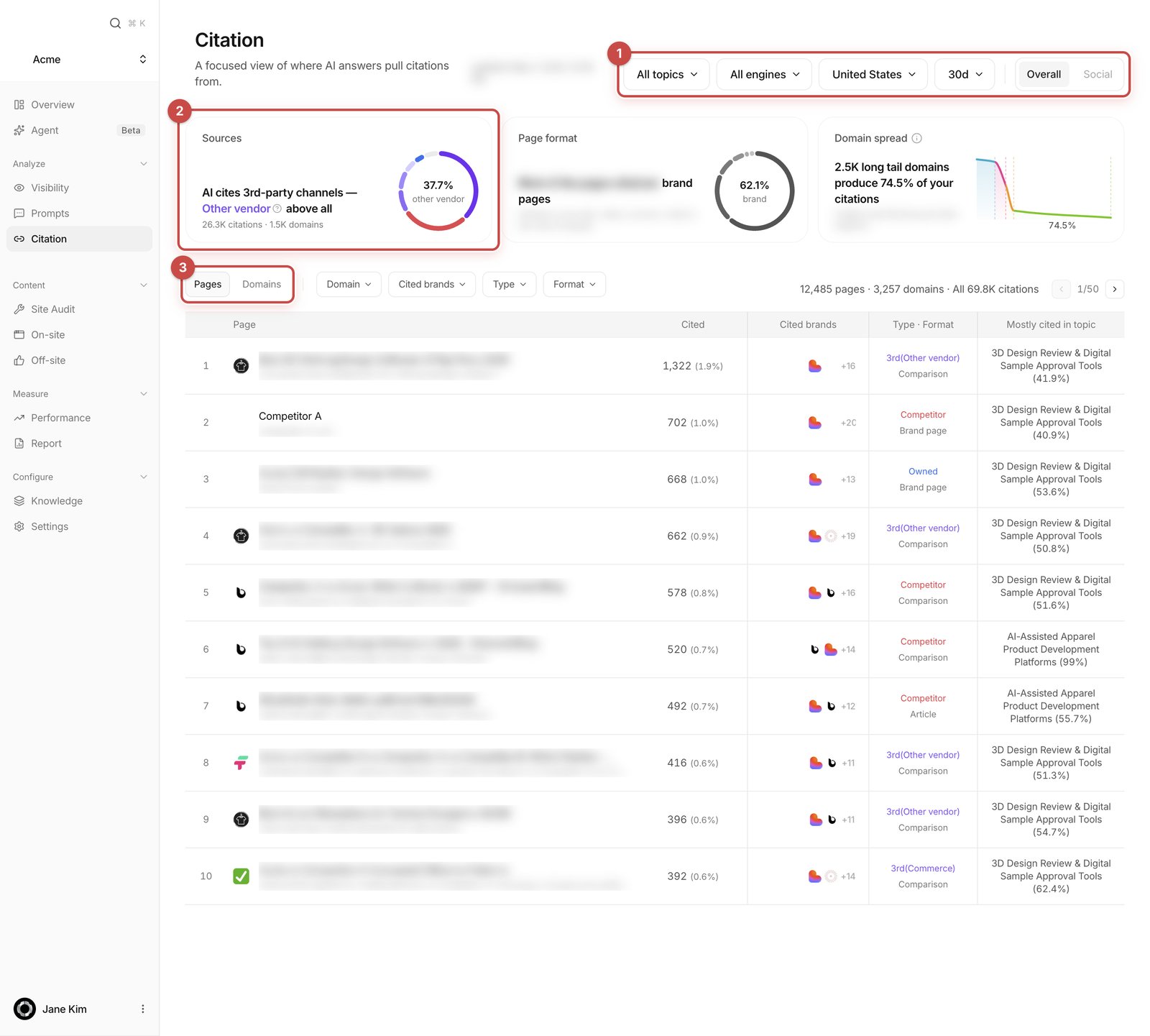 1. **Filters** — topics, AI engine (**All engines**), region, period (**7d / 30d / 60d / 90d**), and the **Overall** · **Social** tabs.
2. **Sources** — one sentence on what AI cites most. **Page format** and **Domain spread** sit beside it.
3. **Pages / Domains** grain pills and the cited pages table.
## Citation is not mention
Get this distinction first and the rest of the page reads easily.
* A **mention** is your brand being named in the answer text. That lives in [Visibility](/dashboard/visibility).
* A **citation** is one source link attached to one AI answer. If the same page is cited in 40 answers, it counts 40 times.
They count different things. An answer that never names your brand can still cite a page. So the two numbers are not supposed to match.
## What's on the screen
### Filters
The controls sit at the top right. The topic filter only appears on the **Overall** tab, and only lists topics the selected region actually measures. Pick an engine from **All engines** to scope the whole page to that engine. The period defaults to 30 days. The region select only shows up for workspaces that measure more than one region. Changing a filter doesn't reload the page, and a scope you already looked at comes straight back for a few minutes.
**Overall** and **Social** are two different views, not filters.
### The three cards
**Sources** answers "what does AI cite most?" in a sentence — for example that third-party channels lead, with **Editorial** above all. Under it you get `[N] citations · [N] domains`, and the donut shows the full source-type mix. Hover a type to see its definition.
**Page format** tells you what shape the cited pages are: Article, Forum / Q\&A, Comparison, Guide / docs, News / PR, Pricing, Brand page, Research, Video, Social post. It's the fastest way to decide what kind of content to make next.
**Domain spread** shows how big the cited sites are. Size is the site's Chrome popularity rank.
| Grade | Range |
| ------------- | --------------------------------------------- |
| **Mega** | top 50,000 sites |
| **Large** | 50,000–500,000 |
| **Mid** | 500,000–1,000,000 |
| **Long tail** | past a million, or too little traffic to rank |
This measures how big the *site* is on the open web, not how much it cites you. The card also gives you the play: pitch Mega domains by name, shortlist the Large domains that keep recurring, and address the long tail by publishing something many of them can cite.
### Source types
The **Type** classification says who owns a domain and what kind of site it is. In the table it prints as `3rd(Reviews)` so the bucket survives.
| Type | What it is |
| ---------------------- | ------------------------------------------------------------- |
| **Owned domains** | your own domains |
| **Competitor domains** | competitors registered in this workspace |
| **Editorial** | unpaid press, trade press, category blogs |
| **PR wire** | paid syndication |
| **Institution** | encyclopedic, academic, government, nonprofit |
| **Reviews** | review and comparison platforms |
| **Commerce** | app stores, marketplaces, retailers |
| **Social** | forums, social networks, video, open publishing |
| **Other vendor** | another company's own site that isn't a registered competitor |
| **Other 3rd-party** | the catch-all |
**Other 3rd-party** is often the single biggest slice. Because it names no actual source, it is never picked as the leading type in the headline — but it still draws in the donut.
### The cited pages table
**Pages** gives you one row per URL, **Domains** one row per domain. The filters beside them are **Domain** (single-select, top 25), **Cited brands** (multi-select), **Type**, **Format** and **Scale**. A **Clear** button appears once anything is filtered. At the right end you get `[N] pages · [N] domains · All [N] citations` and a pager.
The **Pages** columns:
| Column | What it means | How to read it |
| ------------------------- | ------------------------------------------------------------- | ----------------------------------------------------------------- |
| **Page** | page title and URL | **Open page** opens the original in a new tab |
| **Cited** | how many times this page was cited | higher means AI leans on it more |
| **Cited brands** | brands named in the answers that cited this page | shows the competitive context the page is used in |
| **Type · Format** | source type and page shape | tells you what kind of place this is at a glance |
| **Mostly cited in topic** | the topic carrying the largest share of this page's citations | 80% means a dedicated page; 25% means it gets cited from all over |
The shares in **Cited brands** won't add up to the citation count. One answer naming three brands credits all three, so that column describes co-occurrence, not citations.
### The evidence drawer
Click any row and a drawer opens on the right.
1. **Filters** — topics, AI engine (**All engines**), region, period (**7d / 30d / 60d / 90d**), and the **Overall** · **Social** tabs.
2. **Sources** — one sentence on what AI cites most. **Page format** and **Domain spread** sit beside it.
3. **Pages / Domains** grain pills and the cited pages table.
## Citation is not mention
Get this distinction first and the rest of the page reads easily.
* A **mention** is your brand being named in the answer text. That lives in [Visibility](/dashboard/visibility).
* A **citation** is one source link attached to one AI answer. If the same page is cited in 40 answers, it counts 40 times.
They count different things. An answer that never names your brand can still cite a page. So the two numbers are not supposed to match.
## What's on the screen
### Filters
The controls sit at the top right. The topic filter only appears on the **Overall** tab, and only lists topics the selected region actually measures. Pick an engine from **All engines** to scope the whole page to that engine. The period defaults to 30 days. The region select only shows up for workspaces that measure more than one region. Changing a filter doesn't reload the page, and a scope you already looked at comes straight back for a few minutes.
**Overall** and **Social** are two different views, not filters.
### The three cards
**Sources** answers "what does AI cite most?" in a sentence — for example that third-party channels lead, with **Editorial** above all. Under it you get `[N] citations · [N] domains`, and the donut shows the full source-type mix. Hover a type to see its definition.
**Page format** tells you what shape the cited pages are: Article, Forum / Q\&A, Comparison, Guide / docs, News / PR, Pricing, Brand page, Research, Video, Social post. It's the fastest way to decide what kind of content to make next.
**Domain spread** shows how big the cited sites are. Size is the site's Chrome popularity rank.
| Grade | Range |
| ------------- | --------------------------------------------- |
| **Mega** | top 50,000 sites |
| **Large** | 50,000–500,000 |
| **Mid** | 500,000–1,000,000 |
| **Long tail** | past a million, or too little traffic to rank |
This measures how big the *site* is on the open web, not how much it cites you. The card also gives you the play: pitch Mega domains by name, shortlist the Large domains that keep recurring, and address the long tail by publishing something many of them can cite.
### Source types
The **Type** classification says who owns a domain and what kind of site it is. In the table it prints as `3rd(Reviews)` so the bucket survives.
| Type | What it is |
| ---------------------- | ------------------------------------------------------------- |
| **Owned domains** | your own domains |
| **Competitor domains** | competitors registered in this workspace |
| **Editorial** | unpaid press, trade press, category blogs |
| **PR wire** | paid syndication |
| **Institution** | encyclopedic, academic, government, nonprofit |
| **Reviews** | review and comparison platforms |
| **Commerce** | app stores, marketplaces, retailers |
| **Social** | forums, social networks, video, open publishing |
| **Other vendor** | another company's own site that isn't a registered competitor |
| **Other 3rd-party** | the catch-all |
**Other 3rd-party** is often the single biggest slice. Because it names no actual source, it is never picked as the leading type in the headline — but it still draws in the donut.
### The cited pages table
**Pages** gives you one row per URL, **Domains** one row per domain. The filters beside them are **Domain** (single-select, top 25), **Cited brands** (multi-select), **Type**, **Format** and **Scale**. A **Clear** button appears once anything is filtered. At the right end you get `[N] pages · [N] domains · All [N] citations` and a pager.
The **Pages** columns:
| Column | What it means | How to read it |
| ------------------------- | ------------------------------------------------------------- | ----------------------------------------------------------------- |
| **Page** | page title and URL | **Open page** opens the original in a new tab |
| **Cited** | how many times this page was cited | higher means AI leans on it more |
| **Cited brands** | brands named in the answers that cited this page | shows the competitive context the page is used in |
| **Type · Format** | source type and page shape | tells you what kind of place this is at a glance |
| **Mostly cited in topic** | the topic carrying the largest share of this page's citations | 80% means a dedicated page; 25% means it gets cited from all over |
The shares in **Cited brands** won't add up to the citation count. One answer naming three brands credits all three, so that column describes co-occurrence, not citations.
### The evidence drawer
Click any row and a drawer opens on the right.
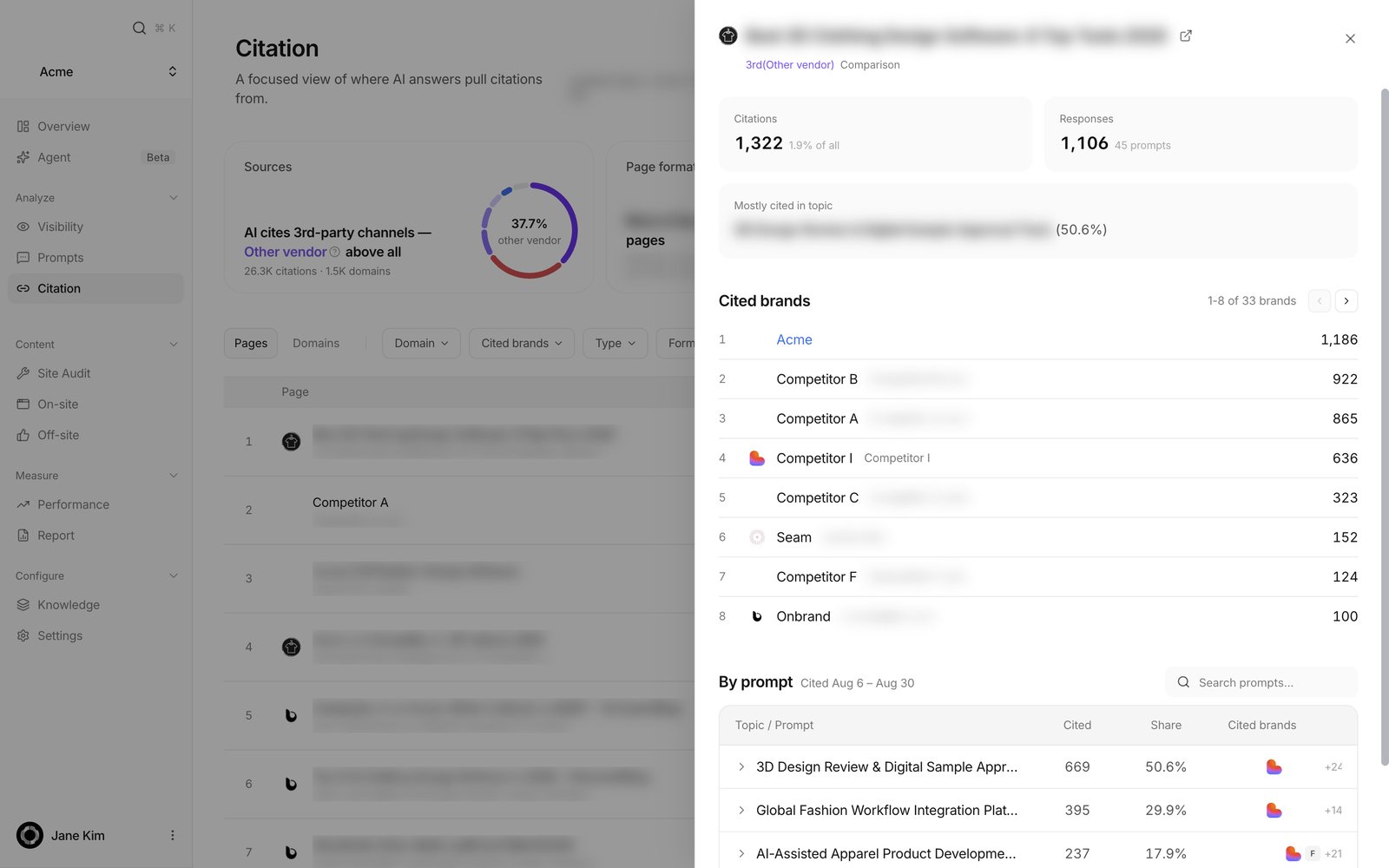 It shows the page title (**Open source in a new tab**), the Type and Format badges, **Citations** (count and share of all), **Responses** (how many prompts it came from), **Cited brands**, and a **By prompt** table. **By prompt** groups prompts by topic with **Cited**, **Share** and **Cited brands**, plus a "Search prompts..." box. Open a domain row and you also get **Cited pages**.
So you can confirm exactly which questions produced the citation. The full AI answer text isn't shown. Close with the **Close** button or by clicking outside.
### The Social tab
This view is about creators — the people shaping what AI says about your category.
**Creator overview** has three donuts. **Share of voice** shows, when a creator names a brand, how often it's you versus a competitor (**You** / **Competitors**). **By platform** shows where creator citations come from (YouTube / Instagram / TikTok). **By size** splits citation share by follower tier: **Nano** (under 10K), **Micro** (10K–100K), **Macro** (100K–1M), **Mega** (1M+), **Unknown**.
**Top 10 creators to win** lists creators who cite a competitor but never you — your seeding shortlist. Expand it for rank, name, platform, handle, followers, citation count and an **Open channel** link.
The creators list below has a "Search creators..." box, platform pills (**All / YouTube / TikTok / Instagram**) and lens pills (**All / Ours / Competitor-only**). Expand a row to see that creator's cited content.
## How to use it
Set the period and engine, then filter the table by the leading **Type** the **Sources** card named (Editorial, Reviews, Social, whichever it is). Work down by **Cited**, open a row's evidence drawer to confirm it's cited for prompts you care about, then take that domain into [Off-site](/dashboard/off-site) work.
Open the **Type** filter and tick **Owned domains** only. Your pages get re-ranked against each other, so you see the ones that would never survive the global top list.
Switch the grain pill to **Domains** to rank publications, pick one in the **Domain** filter, then switch back to **Pages** to see that publication's pages.
On the **Social** tab, expand **Top 10 creators to win** and open each channel. For the full list, use the **Competitor-only** lens pill in the creators list.
## FAQ
AI answers overwhelmingly cite third parties. Owned share is the fraction of *all* cited links pointing at your domains, and on a normal workspace that's a few percent. Tick **Owned domains** in the **Type** filter to rank your own pages against each other instead.
They count different things: links attached to answers versus your brand being named in the answer text. A page can be cited in an answer that never mentions you.
The cards read a deduplicated daily copy of the data; the table reads the raw citation records. Different paths, so small gaps happen. The count above the table is the true total for your filters — the rows on screen are only the top few hundred pages.
The catch-all for domains that matched none of the known categories. It's often the largest slice, and it's deliberately never named as the leading source type because it doesn't name an actual kind of source.
That column measures which brands appeared in the same answers. One answer naming three brands credits all three, so those shares describe co-occurrence, not citations.
Site size. It means a popularity rank past a million on the open web, and says nothing about how often that site cites you.
Topics are set per region. A topic the new region doesn't measure gets dropped, and the page returns to the unfiltered view rather than showing you an empty one.
Either no citations have been captured for this scope yet, or the source data is being verified. Widen the period, clear the engine and topic filters, and try again later. A real failure looks different: the screen says **Couldn't load citation data** with a **Try again** button, and that message means the request failed, not that there are no citations.
No. There's no download on this screen today.
## Related
How often your brand is named in AI answers.
Turn the domains you find here into placements.
Use the cited page formats to shape your own pages.
How the metrics fit together.
It shows the page title (**Open source in a new tab**), the Type and Format badges, **Citations** (count and share of all), **Responses** (how many prompts it came from), **Cited brands**, and a **By prompt** table. **By prompt** groups prompts by topic with **Cited**, **Share** and **Cited brands**, plus a "Search prompts..." box. Open a domain row and you also get **Cited pages**.
So you can confirm exactly which questions produced the citation. The full AI answer text isn't shown. Close with the **Close** button or by clicking outside.
### The Social tab
This view is about creators — the people shaping what AI says about your category.
**Creator overview** has three donuts. **Share of voice** shows, when a creator names a brand, how often it's you versus a competitor (**You** / **Competitors**). **By platform** shows where creator citations come from (YouTube / Instagram / TikTok). **By size** splits citation share by follower tier: **Nano** (under 10K), **Micro** (10K–100K), **Macro** (100K–1M), **Mega** (1M+), **Unknown**.
**Top 10 creators to win** lists creators who cite a competitor but never you — your seeding shortlist. Expand it for rank, name, platform, handle, followers, citation count and an **Open channel** link.
The creators list below has a "Search creators..." box, platform pills (**All / YouTube / TikTok / Instagram**) and lens pills (**All / Ours / Competitor-only**). Expand a row to see that creator's cited content.
## How to use it
Set the period and engine, then filter the table by the leading **Type** the **Sources** card named (Editorial, Reviews, Social, whichever it is). Work down by **Cited**, open a row's evidence drawer to confirm it's cited for prompts you care about, then take that domain into [Off-site](/dashboard/off-site) work.
Open the **Type** filter and tick **Owned domains** only. Your pages get re-ranked against each other, so you see the ones that would never survive the global top list.
Switch the grain pill to **Domains** to rank publications, pick one in the **Domain** filter, then switch back to **Pages** to see that publication's pages.
On the **Social** tab, expand **Top 10 creators to win** and open each channel. For the full list, use the **Competitor-only** lens pill in the creators list.
## FAQ
AI answers overwhelmingly cite third parties. Owned share is the fraction of *all* cited links pointing at your domains, and on a normal workspace that's a few percent. Tick **Owned domains** in the **Type** filter to rank your own pages against each other instead.
They count different things: links attached to answers versus your brand being named in the answer text. A page can be cited in an answer that never mentions you.
The cards read a deduplicated daily copy of the data; the table reads the raw citation records. Different paths, so small gaps happen. The count above the table is the true total for your filters — the rows on screen are only the top few hundred pages.
The catch-all for domains that matched none of the known categories. It's often the largest slice, and it's deliberately never named as the leading source type because it doesn't name an actual kind of source.
That column measures which brands appeared in the same answers. One answer naming three brands credits all three, so those shares describe co-occurrence, not citations.
Site size. It means a popularity rank past a million on the open web, and says nothing about how often that site cites you.
Topics are set per region. A topic the new region doesn't measure gets dropped, and the page returns to the unfiltered view rather than showing you an empty one.
Either no citations have been captured for this scope yet, or the source data is being verified. Widen the period, clear the engine and topic filters, and try again later. A real failure looks different: the screen says **Couldn't load citation data** with a **Try again** button, and that message means the request failed, not that there are no citations.
No. There's no download on this screen today.
## Related
How often your brand is named in AI answers.
Turn the domains you find here into placements.
Use the cited page formats to shape your own pages.
How the metrics fit together.