> ## Documentation Index
> Fetch the complete documentation index at: https://docs.anymorph.ai/llms.txt
> Use this file to discover all available pages before exploring further.
# Prompt
> Manage intent groups, prompts, and AI responses
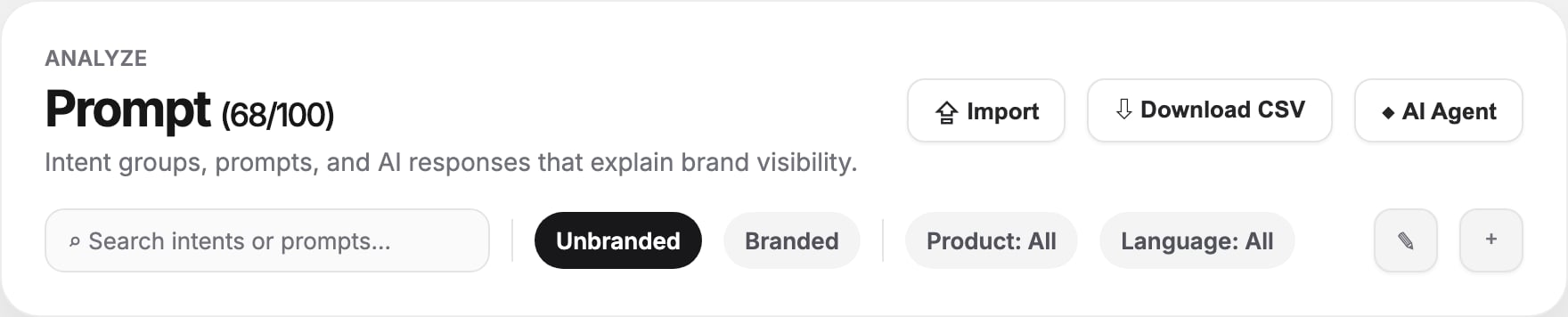
Prompt is where tracked AI-search questions are organized. It groups prompts by user intent, shows which brands and engines appear in responses, and gives you the raw evidence behind Visibility.
 ## What you can manage
| Object | What it represents |
| ------------------- | -------------------------------------------------------------------------------------------------------------------- |
| **Intent group** | A cluster of related user questions, such as alternatives, comparisons, buying guides, or problem/solution research. |
| **Prompt** | The exact question sent to AI engines. |
| **AI response** | The answer returned by an engine for that prompt, including mentioned engines, brands, runs, and citations. |
| **Product mapping** | Product-level context for commerce or multi-product workspaces. |
| **Location** | Language and country targeting for a prompt cluster. |
## Header actions
| Action | Use it for |
| ----------------- | ---------------------------------------------------------------------------------------------------- |
| **Import** | Upload a prompt-factory CSV. You can add new rows or replace existing rows depending on import mode. |
| **Download CSV** | Export all intent groups and prompts for review, editing, or archival. |
| **AI Agent** | Open the prompt management assistant for bulk prompt work. |
| **Generating...** | Indicates prompt generation is currently running. |
Prompt limits are shown next to the page title as `current / limit`. If your workspace has an unlimited plan, the limit displays as Unlimited.
## Filters
Use the toolbar to narrow the table:
* **Search intents or prompts** - Finds matching intent names, descriptions, and prompt text.
* **Unbranded / Branded** - Switch between prompts that do or do not explicitly mention your brand.
* **Product** - Filter to prompts mapped to a product.
* **Language** - Filter multilingual prompt sets.
The count label shows the number of intent groups and prompts currently loaded.
## Intent table
Each intent row shows:
| Column | Meaning |
| ----------------- | ---------------------------------------------------------------------------------------- |
| **Prompt count** | Number of prompts inside the intent group. Click the chevron to expand. |
| **Intent Groups** | Name, intent type badge, and description. Click the name to open the intent detail page. |
| **Product** | Mapped product or product count. |
| **Location** | Language and country targeting. |
| **Top Brands** | Brands most often mentioned for prompts in the group. |
| **Pages** | Related page coverage for that intent. |
## Working with prompts
Expand an intent group to see its prompt rows. Each prompt row shows:
* The prompt text.
* Prompt-factory tier: **head**, **torso**, or **tail** when available.
* Mentioned engines.
* Mentioned brands.
* Run count.
Click a prompt text to open the response drawer. The drawer shows actual AI responses for that prompt, so you can verify whether the answer is favorable, accurate, and cited.
## Create and edit
| Task | How |
| ------------------------- | ------------------------------------------------------------------------------------------ |
| Add an intent group | Click the **+** icon, then enter name, optional product, language, and description. |
| Add a prompt | Expand an intent and click **New Prompt**. |
| Inline edit a prompt | Hover the prompt row and click the edit icon. Save by leaving the field or pressing Enter. |
| Delete prompts | Use the row delete icon. |
| Bulk delete intent groups | Click the edit pencil in the toolbar, select intent groups, then **Delete**. |
## Intent detail page
Click an intent name to open its detail page. It includes:
* **Search demand** - Query demand, representative queries, and SERP/citation overlap.
* **Top brands** - Competitors and peers associated with the intent.
* **Seed keywords** - Keyword seeds behind the group.
* **Prompts** - Prompt list filtered to the intent.
* **Mapped products** - Products connected to the intent.
## How Prompt drives action
| Finding | Recommended action |
| --------------------------------------------- | ------------------------------------------------------------------------------------------------------------------------- |
| Important unbranded prompts never mention you | Create a new [Generate](/dashboard/generate) page or improve sources through [Earn](/dashboard/earn). |
| Branded prompts have weak sentiment | Update [Knowledge](/dashboard/knowledge-base) with accurate brand claims and run [Fix](/dashboard/fix) on existing pages. |
| Competitors dominate one intent group | Create comparison or alternative pages targeting that group. |
| A prompt has no runs | Wait for the next analysis run or confirm the prompt is active in the CSV/import. |
## Related
See how prompt results roll up into visibility scores.
Create pages for intents where your brand is missing.
Add brand facts and rules that improve AI answers.
See which sources AI responses cite for each prompt set.
## What you can manage
| Object | What it represents |
| ------------------- | -------------------------------------------------------------------------------------------------------------------- |
| **Intent group** | A cluster of related user questions, such as alternatives, comparisons, buying guides, or problem/solution research. |
| **Prompt** | The exact question sent to AI engines. |
| **AI response** | The answer returned by an engine for that prompt, including mentioned engines, brands, runs, and citations. |
| **Product mapping** | Product-level context for commerce or multi-product workspaces. |
| **Location** | Language and country targeting for a prompt cluster. |
## Header actions
| Action | Use it for |
| ----------------- | ---------------------------------------------------------------------------------------------------- |
| **Import** | Upload a prompt-factory CSV. You can add new rows or replace existing rows depending on import mode. |
| **Download CSV** | Export all intent groups and prompts for review, editing, or archival. |
| **AI Agent** | Open the prompt management assistant for bulk prompt work. |
| **Generating...** | Indicates prompt generation is currently running. |
Prompt limits are shown next to the page title as `current / limit`. If your workspace has an unlimited plan, the limit displays as Unlimited.
## Filters
Use the toolbar to narrow the table:
* **Search intents or prompts** - Finds matching intent names, descriptions, and prompt text.
* **Unbranded / Branded** - Switch between prompts that do or do not explicitly mention your brand.
* **Product** - Filter to prompts mapped to a product.
* **Language** - Filter multilingual prompt sets.
The count label shows the number of intent groups and prompts currently loaded.
## Intent table
Each intent row shows:
| Column | Meaning |
| ----------------- | ---------------------------------------------------------------------------------------- |
| **Prompt count** | Number of prompts inside the intent group. Click the chevron to expand. |
| **Intent Groups** | Name, intent type badge, and description. Click the name to open the intent detail page. |
| **Product** | Mapped product or product count. |
| **Location** | Language and country targeting. |
| **Top Brands** | Brands most often mentioned for prompts in the group. |
| **Pages** | Related page coverage for that intent. |
## Working with prompts
Expand an intent group to see its prompt rows. Each prompt row shows:
* The prompt text.
* Prompt-factory tier: **head**, **torso**, or **tail** when available.
* Mentioned engines.
* Mentioned brands.
* Run count.
Click a prompt text to open the response drawer. The drawer shows actual AI responses for that prompt, so you can verify whether the answer is favorable, accurate, and cited.
## Create and edit
| Task | How |
| ------------------------- | ------------------------------------------------------------------------------------------ |
| Add an intent group | Click the **+** icon, then enter name, optional product, language, and description. |
| Add a prompt | Expand an intent and click **New Prompt**. |
| Inline edit a prompt | Hover the prompt row and click the edit icon. Save by leaving the field or pressing Enter. |
| Delete prompts | Use the row delete icon. |
| Bulk delete intent groups | Click the edit pencil in the toolbar, select intent groups, then **Delete**. |
## Intent detail page
Click an intent name to open its detail page. It includes:
* **Search demand** - Query demand, representative queries, and SERP/citation overlap.
* **Top brands** - Competitors and peers associated with the intent.
* **Seed keywords** - Keyword seeds behind the group.
* **Prompts** - Prompt list filtered to the intent.
* **Mapped products** - Products connected to the intent.
## How Prompt drives action
| Finding | Recommended action |
| --------------------------------------------- | ------------------------------------------------------------------------------------------------------------------------- |
| Important unbranded prompts never mention you | Create a new [Generate](/dashboard/generate) page or improve sources through [Earn](/dashboard/earn). |
| Branded prompts have weak sentiment | Update [Knowledge](/dashboard/knowledge-base) with accurate brand claims and run [Fix](/dashboard/fix) on existing pages. |
| Competitors dominate one intent group | Create comparison or alternative pages targeting that group. |
| A prompt has no runs | Wait for the next analysis run or confirm the prompt is active in the CSV/import. |
## Related
See how prompt results roll up into visibility scores.
Create pages for intents where your brand is missing.
Add brand facts and rules that improve AI answers.
See which sources AI responses cite for each prompt set.