> ## Documentation Index
> Fetch the complete documentation index at: https://docs.anymorph.ai/llms.txt
> Use this file to discover all available pages before exploring further.
# Make a fix stick
> Where to record a problem you found in a draft so it disappears from every page you generate next
When you spot a wrong sentence in a draft, the natural move is to fix it right there. That fixes one page. The same problem is already in other pages, and it will keep appearing in the pages you generate next week.
The reason is simple. Every page is written from the two documents in [Knowledge](/dashboard/knowledge): **Brand.md** and **Content.md**. Fixing a page changes one result. Fixing a document changes the cause.
## Before you start
* Have a real draft in front of you, from On-site or Off-site review.
* Anyone who can open the workspace can edit both documents, and there is no approval step. Agree internally on who owns them.
## Decide which document owns it
One line settles most cases. **Brand.md is what is true. Content.md is how it must be written.**
| What you found in the draft | Where it goes | What happens on the next run |
| --------------------------------------------------------------------------------- | -------------- | --------------------------------------------- |
| A wrong fact (spec, feature name, price, coverage, launch date, a number) | **Brand.md** | Every page is written with the corrected fact |
| Missing information (a condition or strength this topic must include) | **Brand.md** | It gets mentioned wherever it's relevant |
| A phrase you can't use (regulatory, legal, or an internal rule) | **Content.md** | That phrasing stops being generated |
| A format you want repeated (CTA wording and link, currency format, heading shape) | **Content.md** | Every later page follows that format |
 When you're unsure, ask yourself: is the sentence wrong, or do I just dislike how it's put? Wrong goes to Brand.md. How it's put goes to Content.md.
## Step by step
Write it down at the sentence level. "The enterprise-plan-only condition is missing" transfers into a document far better than "this part feels off".
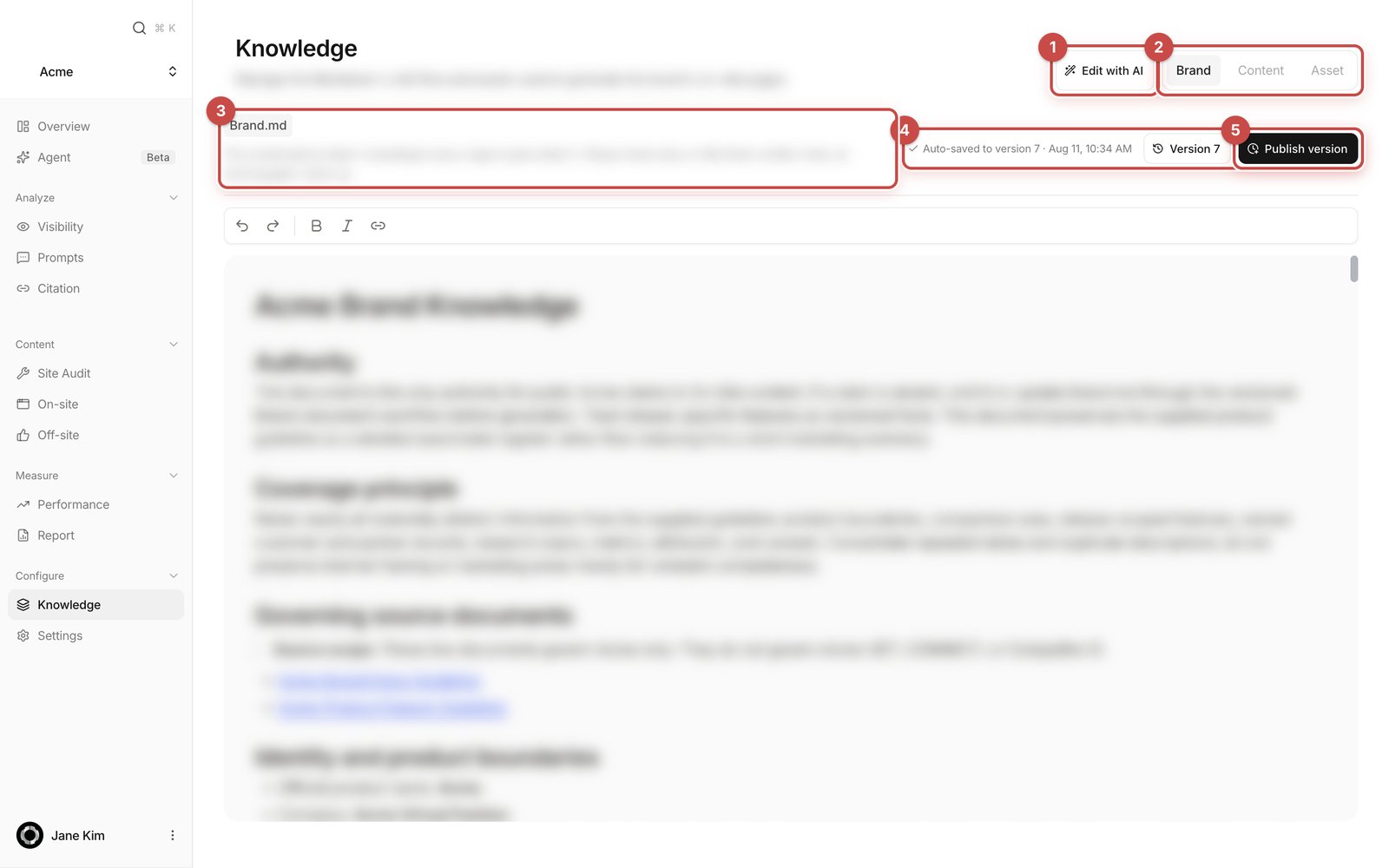
A fact problem goes to the **Brand** tab. A wording or format problem goes to the **Content** tab.
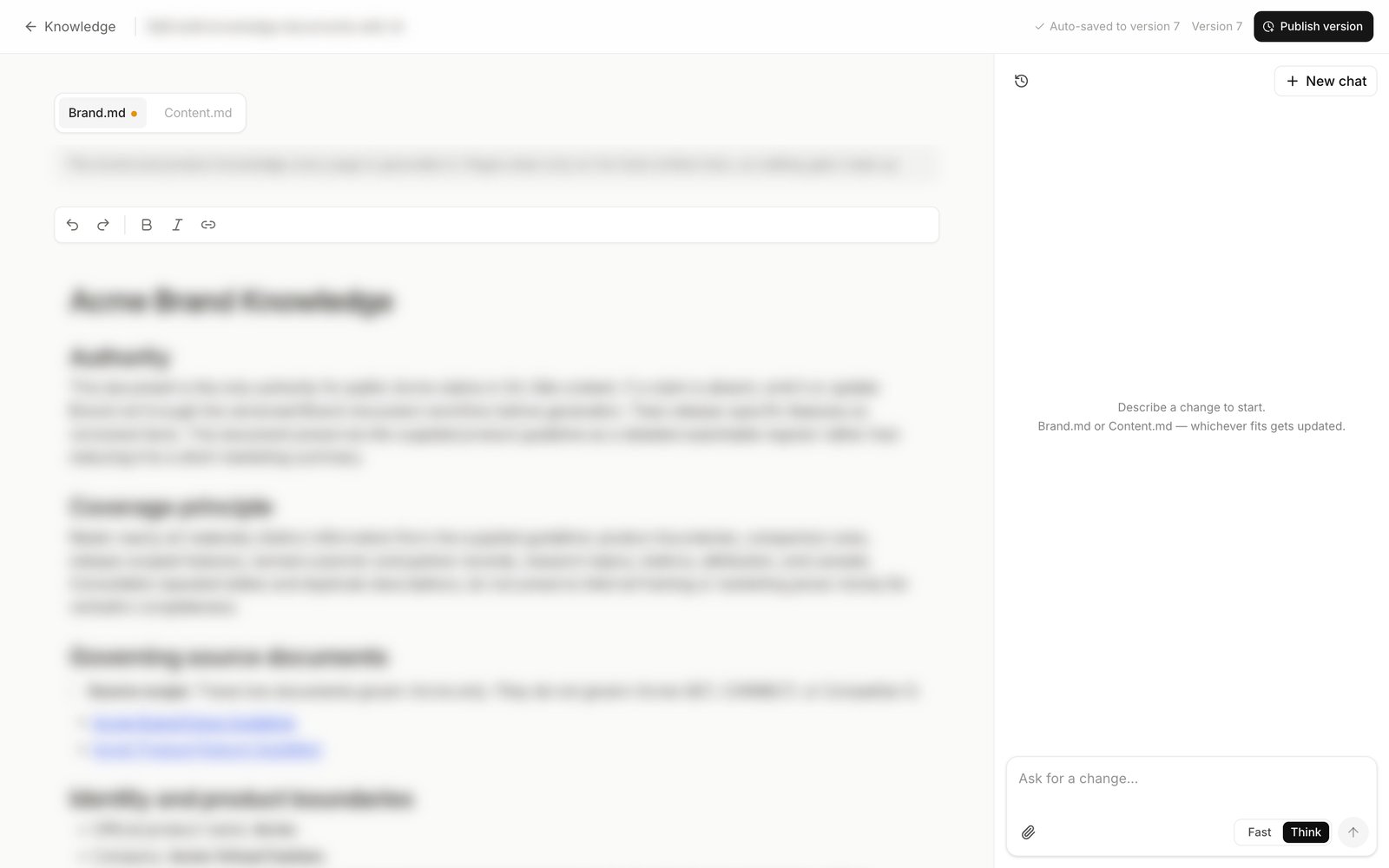
Type straight into the document, or press **Edit with AI** and describe the change, for example "add our refund policy to the brand facts". The assistant returns a **Proposed changes** block; press **Apply**. If you have material to hand, **Attach source files** takes files up to 25 MB each.
When the readout at the top right says **Auto-saved to version \[n]**, your text is stored, and the next generation run already uses it. If it says **Unsaved changes**, the save didn't land, so type again to retry.
Put one line into **Change summary**, such as "Corrected pricing to September 2026", then press **Publish version**. A toast confirms **Published version \[n]**.
Read a freshly generated draft and confirm the problem is gone. If it survived, the sentence you added was probably not specific enough.
**Publish version** is not the switch that turns your edit on. Your edit counts from the moment it autosaves. Publishing marks a numbered saved copy: the number a generated page records as its source, and the point you can restore later.
When you're unsure, ask yourself: is the sentence wrong, or do I just dislike how it's put? Wrong goes to Brand.md. How it's put goes to Content.md.
## Step by step
Write it down at the sentence level. "The enterprise-plan-only condition is missing" transfers into a document far better than "this part feels off".
A fact problem goes to the **Brand** tab. A wording or format problem goes to the **Content** tab.
Type straight into the document, or press **Edit with AI** and describe the change, for example "add our refund policy to the brand facts". The assistant returns a **Proposed changes** block; press **Apply**. If you have material to hand, **Attach source files** takes files up to 25 MB each.
When the readout at the top right says **Auto-saved to version \[n]**, your text is stored, and the next generation run already uses it. If it says **Unsaved changes**, the save didn't land, so type again to retry.
Put one line into **Change summary**, such as "Corrected pricing to September 2026", then press **Publish version**. A toast confirms **Published version \[n]**.
Read a freshly generated draft and confirm the problem is gone. If it survived, the sentence you added was probably not specific enough.
**Publish version** is not the switch that turns your edit on. Your edit counts from the moment it autosaves. Publishing marks a numbered saved copy: the number a generated page records as its source, and the point you can restore later.
 ## Good examples
**Facts for Brand.md**
* Real-time collaboration is on the Enterprise plan only, not on Pro.
* Prices are shown in US dollars, with the local currency alongside for Korean customers.
* Supported languages are Korean, English and Japanese.
* On-premise installation is not supported.
* Only customers on the approved list may be named as case studies.
**Rules for Content.md**
* Every page ends with one consultation CTA at the bottom.
* When stating a price, give both currencies.
* No unverifiable superlatives such as "industry leading" or "the best".
* When a competitor is mentioned, compare published specs only and don't judge them.
* Define a technical term in one sentence the first time it appears.
## What does not belong here
* Marketing fluff. "Innovative" and "unmatched" help neither document.
* Unverifiable superlatives. Content.md is the place to ban them, not to add them.
* Unconfirmed roadmap items or unreleased features. Anything in Brand.md is treated as true and will be written as fact.
* A request that applies to one page only. Fix that in the page itself.
Whatever you put in Brand.md is treated as true and can appear in a page verbatim. Never add unapproved numbers or customer names.
## FAQ
No. Document edits apply from the next generation run onward. Each existing page stays pinned to the version it was written from, so fix a page that is already wrong in the page editor.
Brand.md does. Content.md is not applied to off-site writing, only to the off-site review step, because those pieces publish under another site's editorial rules.
Press **Version \[n]** to open **History**, click an older version to read it, then press **Restore**. Restoring brings that text back as a new version, so nothing in the history is lost.
Specific enough for another person to follow without asking. "Pair effect claims with their conditions" gets followed; "make the tone softer" does not.
The later publish is rejected rather than quietly overwriting theirs. Reload and re-apply your change.
## Related
The two documents, versions, and the image library.
What to focus on when you read a draft.
Fixing the page in front of you.
Where pages are generated from both documents.
## Good examples
**Facts for Brand.md**
* Real-time collaboration is on the Enterprise plan only, not on Pro.
* Prices are shown in US dollars, with the local currency alongside for Korean customers.
* Supported languages are Korean, English and Japanese.
* On-premise installation is not supported.
* Only customers on the approved list may be named as case studies.
**Rules for Content.md**
* Every page ends with one consultation CTA at the bottom.
* When stating a price, give both currencies.
* No unverifiable superlatives such as "industry leading" or "the best".
* When a competitor is mentioned, compare published specs only and don't judge them.
* Define a technical term in one sentence the first time it appears.
## What does not belong here
* Marketing fluff. "Innovative" and "unmatched" help neither document.
* Unverifiable superlatives. Content.md is the place to ban them, not to add them.
* Unconfirmed roadmap items or unreleased features. Anything in Brand.md is treated as true and will be written as fact.
* A request that applies to one page only. Fix that in the page itself.
Whatever you put in Brand.md is treated as true and can appear in a page verbatim. Never add unapproved numbers or customer names.
## FAQ
No. Document edits apply from the next generation run onward. Each existing page stays pinned to the version it was written from, so fix a page that is already wrong in the page editor.
Brand.md does. Content.md is not applied to off-site writing, only to the off-site review step, because those pieces publish under another site's editorial rules.
Press **Version \[n]** to open **History**, click an older version to read it, then press **Restore**. Restoring brings that text back as a new version, so nothing in the history is lost.
Specific enough for another person to follow without asking. "Pair effect claims with their conditions" gets followed; "make the tone softer" does not.
The later publish is rejected rather than quietly overwriting theirs. Reload and re-apply your change.
## Related
The two documents, versions, and the image library.
What to focus on when you read a draft.
Fixing the page in front of you.
Where pages are generated from both documents.