> ## Documentation Index
> Fetch the complete documentation index at: https://docs.anymorph.ai/llms.txt
> Use this file to discover all available pages before exploring further.
# Search Console and indexing
> Connect Google Search Console and get your published pages indexed.
Connecting Google Search Console pulls impressions, clicks, click-through rate, average position and each page's indexing state into the dashboard. It also switches on automatic sitemap submission and the per-page **Request index** button.
Indexing is a Google thing. ChatGPT and Perplexity do not need your page to be in Google's index before they can cite it. Read the two separately.
***
## Part A. Connect Search Console
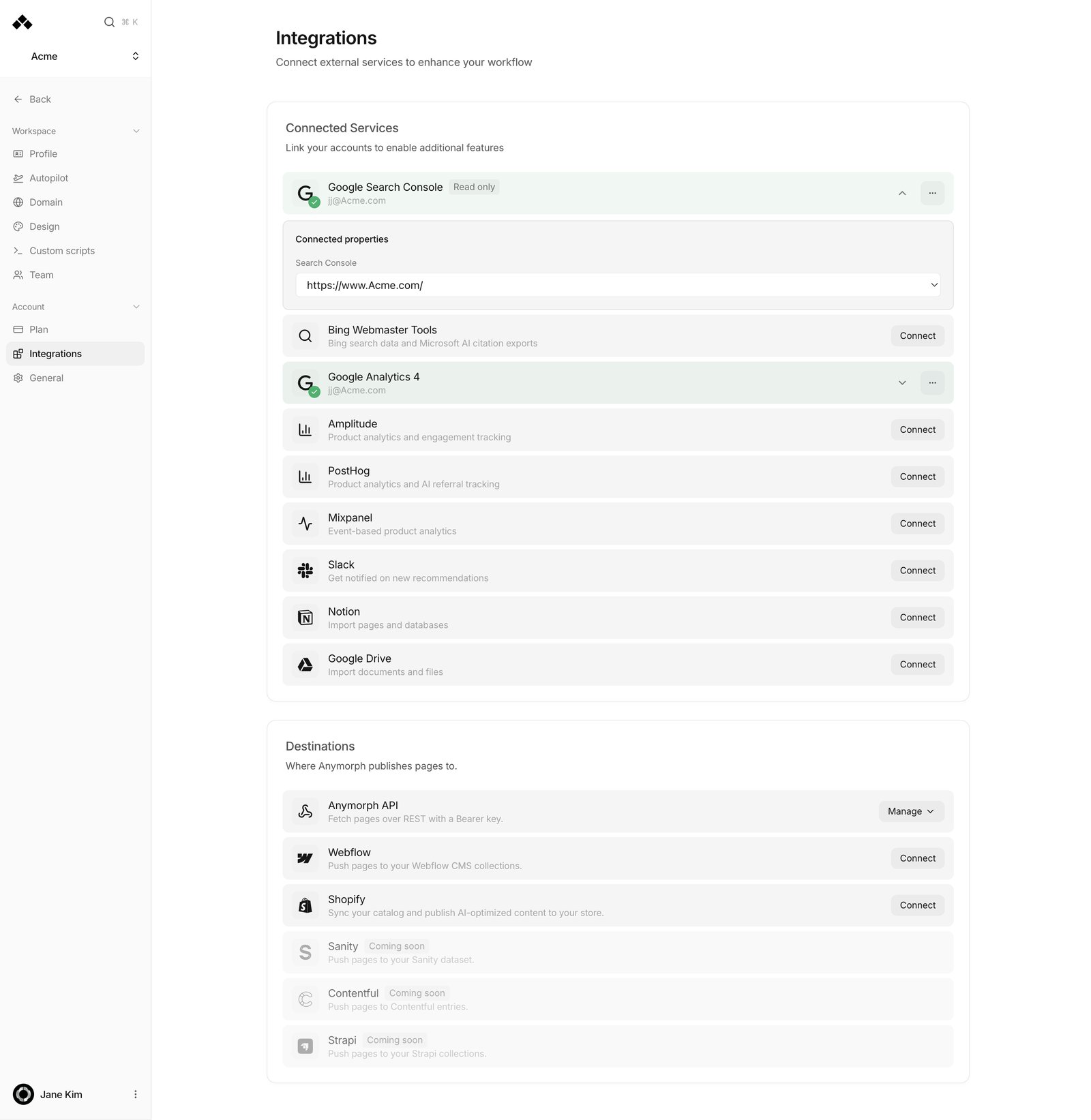
Go to **Settings** → **Integrations** → **Connected Services** and click **Connect** on the **Google Search Console** row ("Organic search performance and indexing").
In the new window, sign in with a Google account that has access to the site and allow the permissions Anymorph asks for: Search Console read and write, site verification, and your email address. You return to *"Google Search Console connected!"*.
Write access is what makes automatic sitemap submission work. If you allow read access only, the card carries a **Read only** badge and sitemaps are never submitted. Reconnect and allow everything to fix it.
Click the connected **Google Search Console** row to expand **Connected properties** → **Search Console**. The dropdown lists the sites that Google account is verified on, plus **Auto-detect from domain**, which is the default. Pick explicitly if you have several.
 **Watch out for these**
* Only sites the signed-in Google account is **verified** on appear. **No verified sites found** means the account has no access — verify it in Search Console first.
* Google treats `www.example.com` and `example.com` as **different** properties. If your data looks empty, you almost certainly picked the wrong half of the www / non-www pair.
* A **Domain property** covers both halves. Use one where you can.
Google Analytics 4 is a **separate card** on the same screen. Connect it too if you want traffic and AI referral numbers — see [AI engine conversions](/guides/ai-engine-conversions).
***
## Part B. One extra permission for AI search impressions
The **AI search impressions** card on [Performance](/dashboard/performance) counts how often Google showed your site inside AI Overviews and AI Mode. That data does not arrive from the connection above alone.
Add **[team@opactor.com](mailto:team@opactor.com) as a full user** on the Search Console property for your domain. Collection starts automatically after that.
Two messages you may see on the card:
* **No Search Console access yet** — that user has not been added yet.
* **No AI report for this site yet** — Google has not opened its generative AI report for this property. It appears on its own once impressions accumulate.
There is no click count or click-through rate on this card, because Google does not publish clicks for AI Overviews and AI Mode. Search Console data also arrives about two days late.
***
## Part C. Three routes to getting indexed
These are three different mechanisms. Use one or all three.
### 1. Automatic sitemap submission — nothing to do
When pages publish, Anymorph builds a sitemap and submits it to Search Console. A batch publish is collapsed into a single submission after about 90 seconds, and an unchanged sitemap is not resubmitted. A daily catch-up job picks up any workspace that never got an initial submission.
It needs two things: an **active custom domain** and a Search Console connection **with write access**. A **Read only** badge means this never runs.
### 2. Request index — page by page
Go to [On-site](/dashboard/on-site) → **Live** and select a page. This only works on published pages.
Three things happen at once: the page URL is copied to your clipboard, a Google Search Console inspection tab opens deep-linked to that URL, and the request is recorded so the status flips to **Requested**.
In the tab that opened you can click Google's own **Request Indexing**. At the same time, if one of Anymorph's verified properties covers that domain, the URL is queued at elevated priority for Anymorph's own submission. Only live, not-yet-indexed pages consume that queue; everything else is skipped.
Google caps requests at roughly **10 per property per day**, so a large batch drains over several days. Changed your mind? **Undo request** clears the stamp and cancels anything still queued.
This needs Search Console connected — without it the inspection link cannot be built.
### 3. IndexNow — instant notification to Bing and friends
On [Settings → Domain](/settings/domain), the **Checklist** has **IndexNow instant indexing**. Paste an existing key or click **Generate**, then save. On CNAME and subdomain routing, Anymorph serves the verification file for you.
On subpath routing your developer must put a `[key].txt` file at your site root containing just the key. Until they do you get *"Key saved but verification file not found. Please deploy the file and refresh."* A malformed key gives *"Invalid key format. Must be 8-128 hex characters."* — using **Generate** avoids that.
***
## Reading the index status on your page list
**Watch out for these**
* Only sites the signed-in Google account is **verified** on appear. **No verified sites found** means the account has no access — verify it in Search Console first.
* Google treats `www.example.com` and `example.com` as **different** properties. If your data looks empty, you almost certainly picked the wrong half of the www / non-www pair.
* A **Domain property** covers both halves. Use one where you can.
Google Analytics 4 is a **separate card** on the same screen. Connect it too if you want traffic and AI referral numbers — see [AI engine conversions](/guides/ai-engine-conversions).
***
## Part B. One extra permission for AI search impressions
The **AI search impressions** card on [Performance](/dashboard/performance) counts how often Google showed your site inside AI Overviews and AI Mode. That data does not arrive from the connection above alone.
Add **[team@opactor.com](mailto:team@opactor.com) as a full user** on the Search Console property for your domain. Collection starts automatically after that.
Two messages you may see on the card:
* **No Search Console access yet** — that user has not been added yet.
* **No AI report for this site yet** — Google has not opened its generative AI report for this property. It appears on its own once impressions accumulate.
There is no click count or click-through rate on this card, because Google does not publish clicks for AI Overviews and AI Mode. Search Console data also arrives about two days late.
***
## Part C. Three routes to getting indexed
These are three different mechanisms. Use one or all three.
### 1. Automatic sitemap submission — nothing to do
When pages publish, Anymorph builds a sitemap and submits it to Search Console. A batch publish is collapsed into a single submission after about 90 seconds, and an unchanged sitemap is not resubmitted. A daily catch-up job picks up any workspace that never got an initial submission.
It needs two things: an **active custom domain** and a Search Console connection **with write access**. A **Read only** badge means this never runs.
### 2. Request index — page by page
Go to [On-site](/dashboard/on-site) → **Live** and select a page. This only works on published pages.
Three things happen at once: the page URL is copied to your clipboard, a Google Search Console inspection tab opens deep-linked to that URL, and the request is recorded so the status flips to **Requested**.
In the tab that opened you can click Google's own **Request Indexing**. At the same time, if one of Anymorph's verified properties covers that domain, the URL is queued at elevated priority for Anymorph's own submission. Only live, not-yet-indexed pages consume that queue; everything else is skipped.
Google caps requests at roughly **10 per property per day**, so a large batch drains over several days. Changed your mind? **Undo request** clears the stamp and cancels anything still queued.
This needs Search Console connected — without it the inspection link cannot be built.
### 3. IndexNow — instant notification to Bing and friends
On [Settings → Domain](/settings/domain), the **Checklist** has **IndexNow instant indexing**. Paste an existing key or click **Generate**, then save. On CNAME and subdomain routing, Anymorph serves the verification file for you.
On subpath routing your developer must put a `[key].txt` file at your site root containing just the key. Until they do you get *"Key saved but verification file not found. Please deploy the file and refresh."* A malformed key gives *"Invalid key format. Must be 8-128 hex characters."* — using **Generate** avoids that.
***
## Reading the index status on your page list
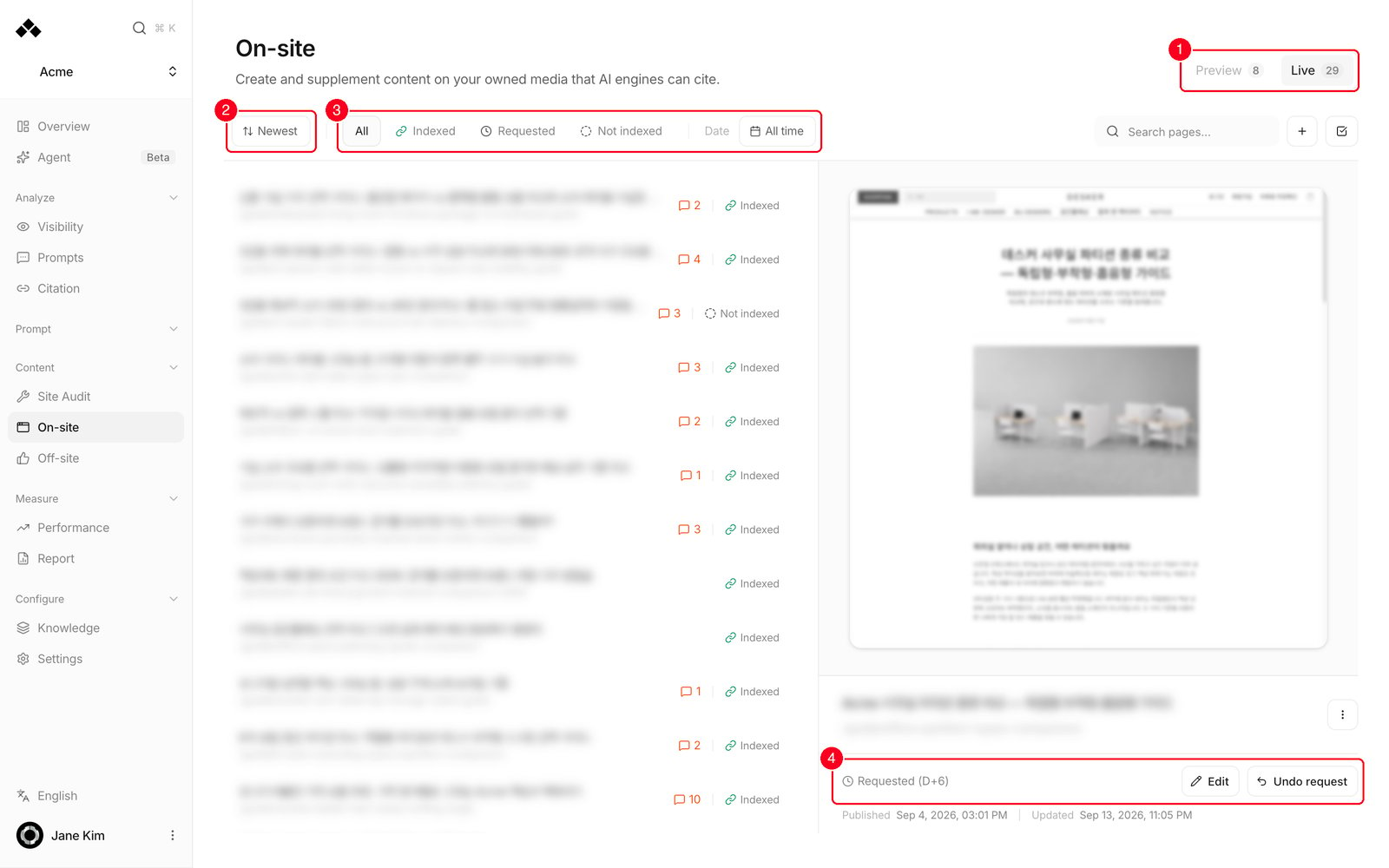 The numbered areas are explained on the [On-site](/dashboard/on-site) page.
| Status | What it means | What to do |
| --------------------- | ------------------------------------------------------------ | ------------------------------------------------------------- |
| **Indexed** | Google has indexed this page | Nothing. Watch it on [Performance](/dashboard/performance) |
| **Canonical indexed** | Google indexed a different address it considers the main one | Usually fine. Just check the duplicate address is intentional |
| **Requested (D+n)** | You asked n days ago | Wait. After 7 days the dot turns red |
| **Not indexed** | Not indexed, with Google's own reason next to it | Work through the checks below |
**When a page is not indexed**
1. Confirm the page really opens on the connected domain.
2. Confirm the Search Console property covers that exact address (mind the www).
3. Check `robots.txt` allows the path.
4. Check the sitemap was submitted (a **Read only** badge means it was not).
5. Then use **Request index**.
If Google says "Discovered - currently not indexed", that is Google's judgement about the page, not a setup fault. Strengthening the content and adding internal links helps more than resubmitting.
Google decides how long indexing takes. Days to weeks is normal — use the **Requested (D+n)** counter as your cue to chase it.
Not indexed does not mean no GEO results. ChatGPT and Perplexity crawl the web themselves and regularly cite pages Google never indexed. That is why [Overview](/dashboard/overview) shows published, indexed and cited as three separate numbers rather than one funnel.
***
## Related
The prerequisite for everything on this page.
Connected services and property selection.
Where you publish pages and request indexing.
AI search impressions and citation results.
The numbered areas are explained on the [On-site](/dashboard/on-site) page.
| Status | What it means | What to do |
| --------------------- | ------------------------------------------------------------ | ------------------------------------------------------------- |
| **Indexed** | Google has indexed this page | Nothing. Watch it on [Performance](/dashboard/performance) |
| **Canonical indexed** | Google indexed a different address it considers the main one | Usually fine. Just check the duplicate address is intentional |
| **Requested (D+n)** | You asked n days ago | Wait. After 7 days the dot turns red |
| **Not indexed** | Not indexed, with Google's own reason next to it | Work through the checks below |
**When a page is not indexed**
1. Confirm the page really opens on the connected domain.
2. Confirm the Search Console property covers that exact address (mind the www).
3. Check `robots.txt` allows the path.
4. Check the sitemap was submitted (a **Read only** badge means it was not).
5. Then use **Request index**.
If Google says "Discovered - currently not indexed", that is Google's judgement about the page, not a setup fault. Strengthening the content and adding internal links helps more than resubmitting.
Google decides how long indexing takes. Days to weeks is normal — use the **Requested (D+n)** counter as your cue to chase it.
Not indexed does not mean no GEO results. ChatGPT and Perplexity crawl the web themselves and regularly cite pages Google never indexed. That is why [Overview](/dashboard/overview) shows published, indexed and cited as three separate numbers rather than one funnel.
***
## Related
The prerequisite for everything on this page.
Connected services and property selection.
Where you publish pages and request indexing.
AI search impressions and citation results.