> ## Documentation Index
> Fetch the complete documentation index at: https://docs.anymorph.ai/llms.txt
> Use this file to discover all available pages before exploring further.
# Prompt
> Intent group, prompt, AI response를 관리합니다
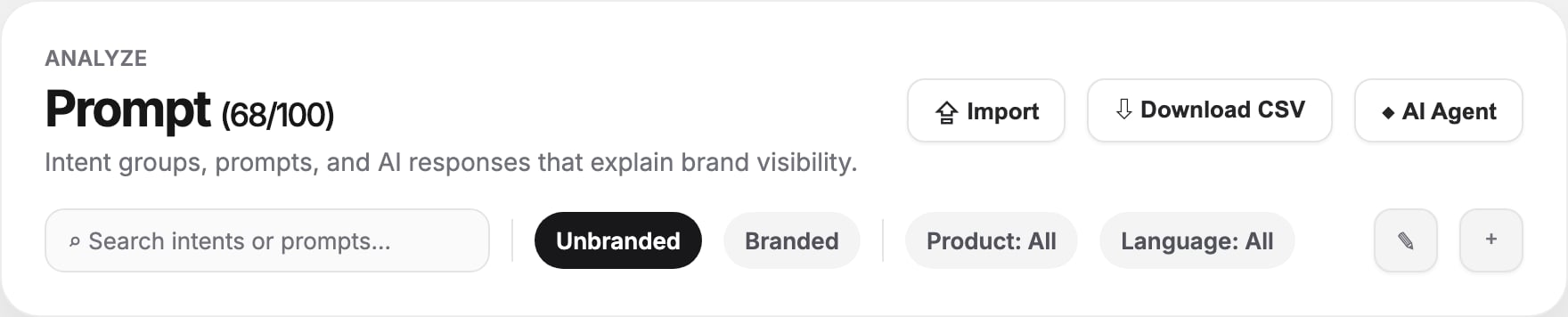
Prompt는 추적하는 AI-search 질문을 관리하는 화면입니다. 사용자 intent별로 prompt를 묶고, 어떤 브랜드와 엔진이 응답에 등장하는지 보여주며, Visibility의 근거가 되는 실제 AI 응답을 확인할 수 있습니다.
 ## 관리 대상
| 대상 | 의미 |
| ------------------- | -------------------------------------------------- |
| **Intent group** | alternatives, comparison, buying guide 같은 관련 질문 묶음 |
| **Prompt** | AI 엔진에 보내는 정확한 질문 |
| **AI response** | 엔진이 반환한 답변, mention, brand, run, citation 정보 |
| **Product mapping** | 상품 단위 context |
| **Location** | 언어와 국가 타깃 |
## 헤더 액션
| 액션 | 용도 |
| ----------------- | --------------------------------------- |
| **Import** | prompt-factory CSV 업로드. 추가 또는 교체 모드로 반영 |
| **Download CSV** | 전체 intent group과 prompt 내보내기 |
| **AI Agent** | 대량 prompt 관리를 위한 assistant 열기 |
| **Generating...** | prompt 생성 작업 진행 중 표시 |
페이지 제목 옆에는 `current / limit` 형태로 prompt 사용량이 표시됩니다. 무제한 플랜은 Unlimited로 표시됩니다.
## 필터
* **Search intents or prompts** - intent 이름, 설명, prompt 텍스트 검색
* **Unbranded / Branded** - 브랜드명이 포함되지 않은/포함된 prompt 전환
* **Product** - 상품별 prompt 필터
* **Language** - 다국어 prompt set 필터
## Intent table
| 컬럼 | 의미 |
| ----------------- | ---------------------------------------- |
| **Prompt count** | intent group 안의 prompt 수. chevron을 눌러 펼침 |
| **Intent Groups** | 이름, intent type, 설명. 이름 클릭 시 상세 페이지 이동 |
| **Product** | 매핑된 상품 또는 상품 수 |
| **Location** | 언어와 국가 |
| **Top Brands** | 해당 그룹에서 가장 많이 언급된 브랜드 |
| **Pages** | 관련 페이지 coverage |
## Prompt 작업
Intent group을 펼치면 prompt row가 표시됩니다.
* Prompt text
* prompt-factory tier: **head**, **torso**, **tail**
* Mentioned engines
* Mentioned brands
* Run count
Prompt 텍스트를 클릭하면 response drawer가 열립니다. 실제 AI 응답을 읽고 답변이 유리한지, 정확한지, citation이 있는지 확인하세요.
## 생성/수정
| 작업 | 방법 |
| ------------------ | ----------------------------------------- |
| Intent group 추가 | **+** 아이콘 클릭 후 이름, 상품, 언어, 설명 입력 |
| Prompt 추가 | intent를 펼치고 **New Prompt** 클릭 |
| Prompt inline edit | row의 edit 아이콘 클릭 후 수정 |
| Prompt 삭제 | row의 delete 아이콘 사용 |
| Intent group 일괄 삭제 | toolbar의 pencil 클릭, group 선택 후 **Delete** |
## Intent 상세 페이지
Intent 이름을 클릭하면 상세 페이지가 열립니다.
* **Search demand** - query demand, representative query, SERP/citation overlap
* **Top brands** - intent와 관련된 경쟁/동종 브랜드
* **Seed keywords** - intent group의 keyword seed
* **Prompts** - 해당 intent의 prompt 목록
* **Mapped products** - 연결된 상품
## 액션으로 연결하기
| 발견 | 추천 행동 |
| -------------------------------- | --------------------------------------------------------------------------------- |
| 중요한 unbranded prompt에서 브랜드가 안 나옴 | [Generate](/ko/dashboard/generate) 페이지 생성 또는 [Earn](/ko/dashboard/earn) source 강화 |
| branded prompt sentiment가 약함 | [Knowledge](/ko/dashboard/knowledge-base) 보강 및 [Fix](/ko/dashboard/fix) 실행 |
| 특정 intent에서 경쟁사가 우세 | comparison/alternative 페이지 생성 |
| run이 없는 prompt | 다음 analysis run을 실행하거나 prompt 활성 여부 확인 |
## 관련 문서
prompt 결과가 visibility score로 어떻게 합산되는지 봅니다.
브랜드가 빠진 intent를 위한 페이지를 만듭니다.
AI 답변 품질을 높이는 브랜드 사실과 규칙을 추가합니다.
prompt set의 응답이 어떤 출처를 인용하는지 봅니다.
## 관리 대상
| 대상 | 의미 |
| ------------------- | -------------------------------------------------- |
| **Intent group** | alternatives, comparison, buying guide 같은 관련 질문 묶음 |
| **Prompt** | AI 엔진에 보내는 정확한 질문 |
| **AI response** | 엔진이 반환한 답변, mention, brand, run, citation 정보 |
| **Product mapping** | 상품 단위 context |
| **Location** | 언어와 국가 타깃 |
## 헤더 액션
| 액션 | 용도 |
| ----------------- | --------------------------------------- |
| **Import** | prompt-factory CSV 업로드. 추가 또는 교체 모드로 반영 |
| **Download CSV** | 전체 intent group과 prompt 내보내기 |
| **AI Agent** | 대량 prompt 관리를 위한 assistant 열기 |
| **Generating...** | prompt 생성 작업 진행 중 표시 |
페이지 제목 옆에는 `current / limit` 형태로 prompt 사용량이 표시됩니다. 무제한 플랜은 Unlimited로 표시됩니다.
## 필터
* **Search intents or prompts** - intent 이름, 설명, prompt 텍스트 검색
* **Unbranded / Branded** - 브랜드명이 포함되지 않은/포함된 prompt 전환
* **Product** - 상품별 prompt 필터
* **Language** - 다국어 prompt set 필터
## Intent table
| 컬럼 | 의미 |
| ----------------- | ---------------------------------------- |
| **Prompt count** | intent group 안의 prompt 수. chevron을 눌러 펼침 |
| **Intent Groups** | 이름, intent type, 설명. 이름 클릭 시 상세 페이지 이동 |
| **Product** | 매핑된 상품 또는 상품 수 |
| **Location** | 언어와 국가 |
| **Top Brands** | 해당 그룹에서 가장 많이 언급된 브랜드 |
| **Pages** | 관련 페이지 coverage |
## Prompt 작업
Intent group을 펼치면 prompt row가 표시됩니다.
* Prompt text
* prompt-factory tier: **head**, **torso**, **tail**
* Mentioned engines
* Mentioned brands
* Run count
Prompt 텍스트를 클릭하면 response drawer가 열립니다. 실제 AI 응답을 읽고 답변이 유리한지, 정확한지, citation이 있는지 확인하세요.
## 생성/수정
| 작업 | 방법 |
| ------------------ | ----------------------------------------- |
| Intent group 추가 | **+** 아이콘 클릭 후 이름, 상품, 언어, 설명 입력 |
| Prompt 추가 | intent를 펼치고 **New Prompt** 클릭 |
| Prompt inline edit | row의 edit 아이콘 클릭 후 수정 |
| Prompt 삭제 | row의 delete 아이콘 사용 |
| Intent group 일괄 삭제 | toolbar의 pencil 클릭, group 선택 후 **Delete** |
## Intent 상세 페이지
Intent 이름을 클릭하면 상세 페이지가 열립니다.
* **Search demand** - query demand, representative query, SERP/citation overlap
* **Top brands** - intent와 관련된 경쟁/동종 브랜드
* **Seed keywords** - intent group의 keyword seed
* **Prompts** - 해당 intent의 prompt 목록
* **Mapped products** - 연결된 상품
## 액션으로 연결하기
| 발견 | 추천 행동 |
| -------------------------------- | --------------------------------------------------------------------------------- |
| 중요한 unbranded prompt에서 브랜드가 안 나옴 | [Generate](/ko/dashboard/generate) 페이지 생성 또는 [Earn](/ko/dashboard/earn) source 강화 |
| branded prompt sentiment가 약함 | [Knowledge](/ko/dashboard/knowledge-base) 보강 및 [Fix](/ko/dashboard/fix) 실행 |
| 특정 intent에서 경쟁사가 우세 | comparison/alternative 페이지 생성 |
| run이 없는 prompt | 다음 analysis run을 실행하거나 prompt 활성 여부 확인 |
## 관련 문서
prompt 결과가 visibility score로 어떻게 합산되는지 봅니다.
브랜드가 빠진 intent를 위한 페이지를 만듭니다.
AI 답변 품질을 높이는 브랜드 사실과 규칙을 추가합니다.
prompt set의 응답이 어떤 출처를 인용하는지 봅니다.