> ## Documentation Index
> Fetch the complete documentation index at: https://docs.anymorph.ai/llms.txt
> Use this file to discover all available pages before exploring further.
# Profile
> Tell Anymorph who your brand is, which names count as a mention, and who your competitors are.
**Profile** is everything Anymorph knows about your brand. The names, domains and positioning stored here decide how mentions are counted and how your content is written. Open it when your brand name changes, when a nickname is missing from your numbers, or when you want to track another competitor.
 1. Page header — the pencil next to **Brand profile** opens the edit dialog, and **Update Brand** re-reads your website and refreshes the brand information.
2. **Competitors** card — the competitors you track, with the add and edit menus.
## What's on the screen
**Overview** shows your logo, brand name, industry, pricing-tier and market-position badges, your main domain plus any other owned domains, and your description.
**Positioning** is read-only. It collects Value Proposition, Target Audience, Use Cases, Target Regions (language chips, with "(default)" on the primary one), Business Info, Pain Points Addressed, Brand Claims, Service Regions and Target Markets.
**Keywords & Entities** lists Brand Names, Product Names, Feature Names, and Seed Keywords grouped as BOFU (Decision), MOFU (Consideration) and TOFU (Awareness).
**Competitors** lists each tracked competitor with its visibility and share numbers. **Add** creates one; the row menu offers **Edit** and delete.
The last line under the cards is your analysis schedule, for example "Daily analysis enabled · 09:00 \[timezone] · Next: …". If your plan is not eligible you see "Upgrade to Starter plan or higher to enable daily analysis" instead.
## Every field
The pencil icon next to the title opens the **Edit Brand Profile** dialog.
1. Page header — the pencil next to **Brand profile** opens the edit dialog, and **Update Brand** re-reads your website and refreshes the brand information.
2. **Competitors** card — the competitors you track, with the add and edit menus.
## What's on the screen
**Overview** shows your logo, brand name, industry, pricing-tier and market-position badges, your main domain plus any other owned domains, and your description.
**Positioning** is read-only. It collects Value Proposition, Target Audience, Use Cases, Target Regions (language chips, with "(default)" on the primary one), Business Info, Pain Points Addressed, Brand Claims, Service Regions and Target Markets.
**Keywords & Entities** lists Brand Names, Product Names, Feature Names, and Seed Keywords grouped as BOFU (Decision), MOFU (Consideration) and TOFU (Awareness).
**Competitors** lists each tracked competitor with its visibility and share numbers. **Add** creates one; the row menu offers **Edit** and delete.
The last line under the cards is your analysis schedule, for example "Daily analysis enabled · 09:00 \[timezone] · Next: …". If your plan is not eligible you see "Upgrade to Starter plan or higher to enable daily analysis" instead.
## Every field
The pencil icon next to the title opens the **Edit Brand Profile** dialog.
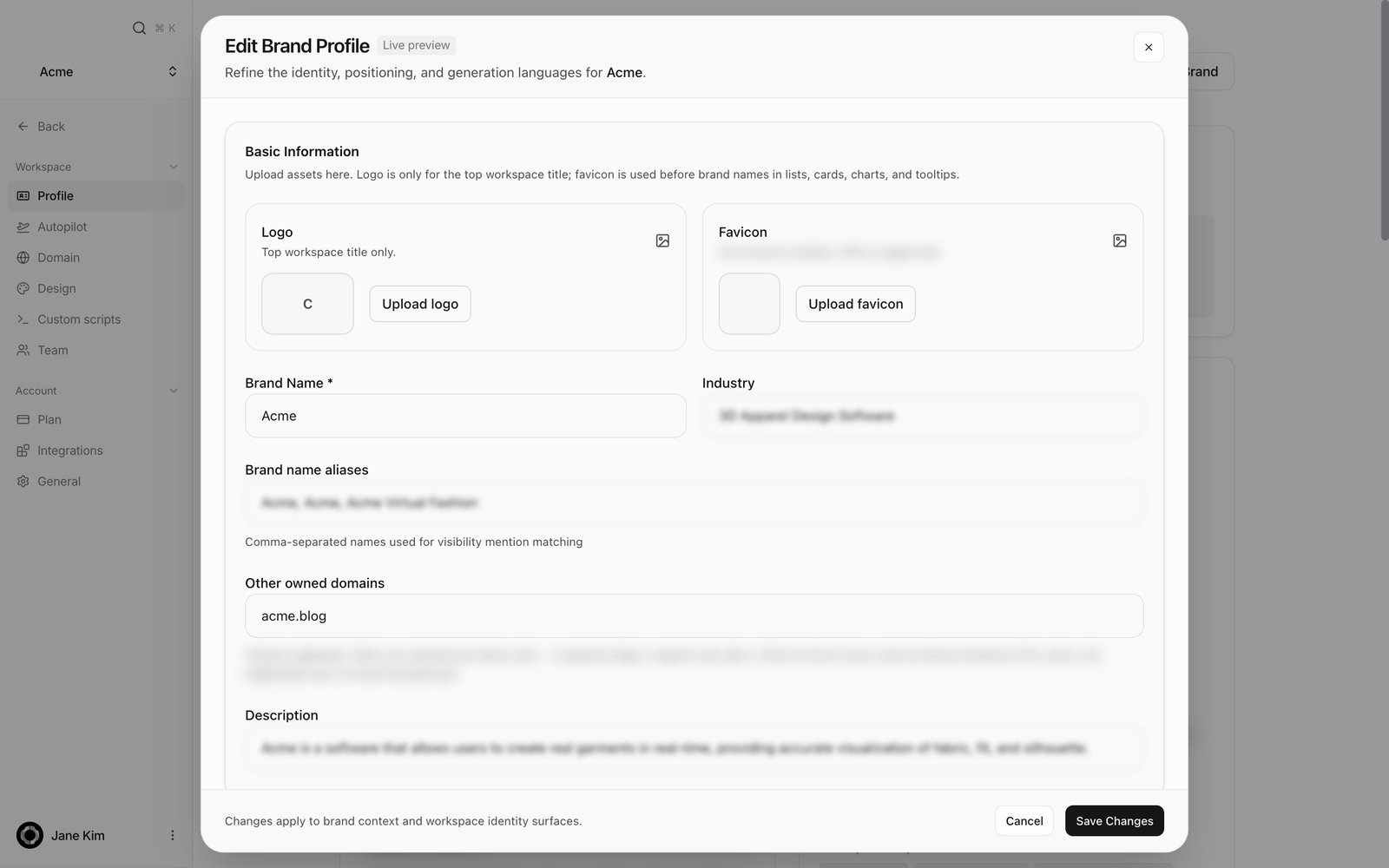 | Field | What it does | Where it takes effect |
| -------------------------------------------------------------------- | ------------------------------------------------------------ | ---------------------------------------------------------------------------- |
| **Logo** | Upload or remove your logo | The workspace title area |
| **Favicon** | Upload one, or go back to the default | Screens that show your brand name |
| **Brand Name** | Your official name (required) | The base name for mention matching |
| **Industry** | Your industry | Brand context |
| **Brand name aliases** | Comma-separated spellings | Mention matching. A spelling that is not listed is not counted |
| **Other owned domains** | Other sites you own | Citations from them count as Owned instead of 3rd-party. Subdomains included |
| **Description** / **Unique Value Proposition** / **Target Audience** | Free text about your brand | Brand context used when writing content |
| **Pricing Tier** | Free / Freemium / Budget / Mid-market / Premium / Enterprise | The Overview badge |
| **Market Position** | Leader / Challenger / Niche / Emerging | The Overview badge |
| **Primary Language** | Default language for content | The default language of generated pages |
| **Supported Languages** | Extra languages you can use | Languages available for translated pages |
Close with **Cancel** or **Save Changes**. The footer reads "Changes apply to brand context and workspace identity surfaces."
The **Add Competitor** / **Edit Competitor** dialog has these fields.
| Field | What it does |
| --------------- | ------------------------------------------------------------------------------- |
| **Name** | The competitor's official name (required) |
| **Domain** | Their main domain |
| **Favicon** | The icon used in charts and lists |
| **Line color** | Their chart colour. An invalid value blocks Save |
| **Brand Names** | Every spelling AI answers use for them. Mentions are counted only against these |
Deleting a competitor tells you what went with it: "Competitor deleted (N mentions, M scores removed)".
## How to use it
Pencil icon → **Brand name aliases** → list every spelling AI answers actually use, separated by commas → **Save Changes**. Include local-language spellings, abbreviations and former names.
Put it in **Other owned domains** and save. Citations from that domain then count as Owned.
**Competitors** → **Add** → name, domain and every spelling → save. The next analysis includes them.
Press **Update Brand**. It changes to "Updating…" while it works, then confirms with "Brand updated".
## FAQ
Only if the nickname is in **Brand name aliases**. Mentions are matched against your official name and that list, nothing else.
Against the competitor's **Brand Names** list plus their official name. A missing spelling means an undercount.
Both cards are read-only. They are filled from your website and refresh when you press **Update Brand**.
Names and aliases are the matching rule, so visibility and report figures are recalculated from the saved data.
That is a plan condition. Starter and above run daily. Check [Plan](/settings/plan).
## Related
See how mention rate and share of voice are counted.
Check the Owned versus 3rd-party split.
Manage Brand.md and Content.md.
| Field | What it does | Where it takes effect |
| -------------------------------------------------------------------- | ------------------------------------------------------------ | ---------------------------------------------------------------------------- |
| **Logo** | Upload or remove your logo | The workspace title area |
| **Favicon** | Upload one, or go back to the default | Screens that show your brand name |
| **Brand Name** | Your official name (required) | The base name for mention matching |
| **Industry** | Your industry | Brand context |
| **Brand name aliases** | Comma-separated spellings | Mention matching. A spelling that is not listed is not counted |
| **Other owned domains** | Other sites you own | Citations from them count as Owned instead of 3rd-party. Subdomains included |
| **Description** / **Unique Value Proposition** / **Target Audience** | Free text about your brand | Brand context used when writing content |
| **Pricing Tier** | Free / Freemium / Budget / Mid-market / Premium / Enterprise | The Overview badge |
| **Market Position** | Leader / Challenger / Niche / Emerging | The Overview badge |
| **Primary Language** | Default language for content | The default language of generated pages |
| **Supported Languages** | Extra languages you can use | Languages available for translated pages |
Close with **Cancel** or **Save Changes**. The footer reads "Changes apply to brand context and workspace identity surfaces."
The **Add Competitor** / **Edit Competitor** dialog has these fields.
| Field | What it does |
| --------------- | ------------------------------------------------------------------------------- |
| **Name** | The competitor's official name (required) |
| **Domain** | Their main domain |
| **Favicon** | The icon used in charts and lists |
| **Line color** | Their chart colour. An invalid value blocks Save |
| **Brand Names** | Every spelling AI answers use for them. Mentions are counted only against these |
Deleting a competitor tells you what went with it: "Competitor deleted (N mentions, M scores removed)".
## How to use it
Pencil icon → **Brand name aliases** → list every spelling AI answers actually use, separated by commas → **Save Changes**. Include local-language spellings, abbreviations and former names.
Put it in **Other owned domains** and save. Citations from that domain then count as Owned.
**Competitors** → **Add** → name, domain and every spelling → save. The next analysis includes them.
Press **Update Brand**. It changes to "Updating…" while it works, then confirms with "Brand updated".
## FAQ
Only if the nickname is in **Brand name aliases**. Mentions are matched against your official name and that list, nothing else.
Against the competitor's **Brand Names** list plus their official name. A missing spelling means an undercount.
Both cards are read-only. They are filled from your website and refresh when you press **Update Brand**.
Names and aliases are the matching rule, so visibility and report figures are recalculated from the saved data.
That is a plan condition. Starter and above run daily. Check [Plan](/settings/plan).
## Related
See how mention rate and share of voice are counted.
Check the Owned versus 3rd-party split.
Manage Brand.md and Content.md.