

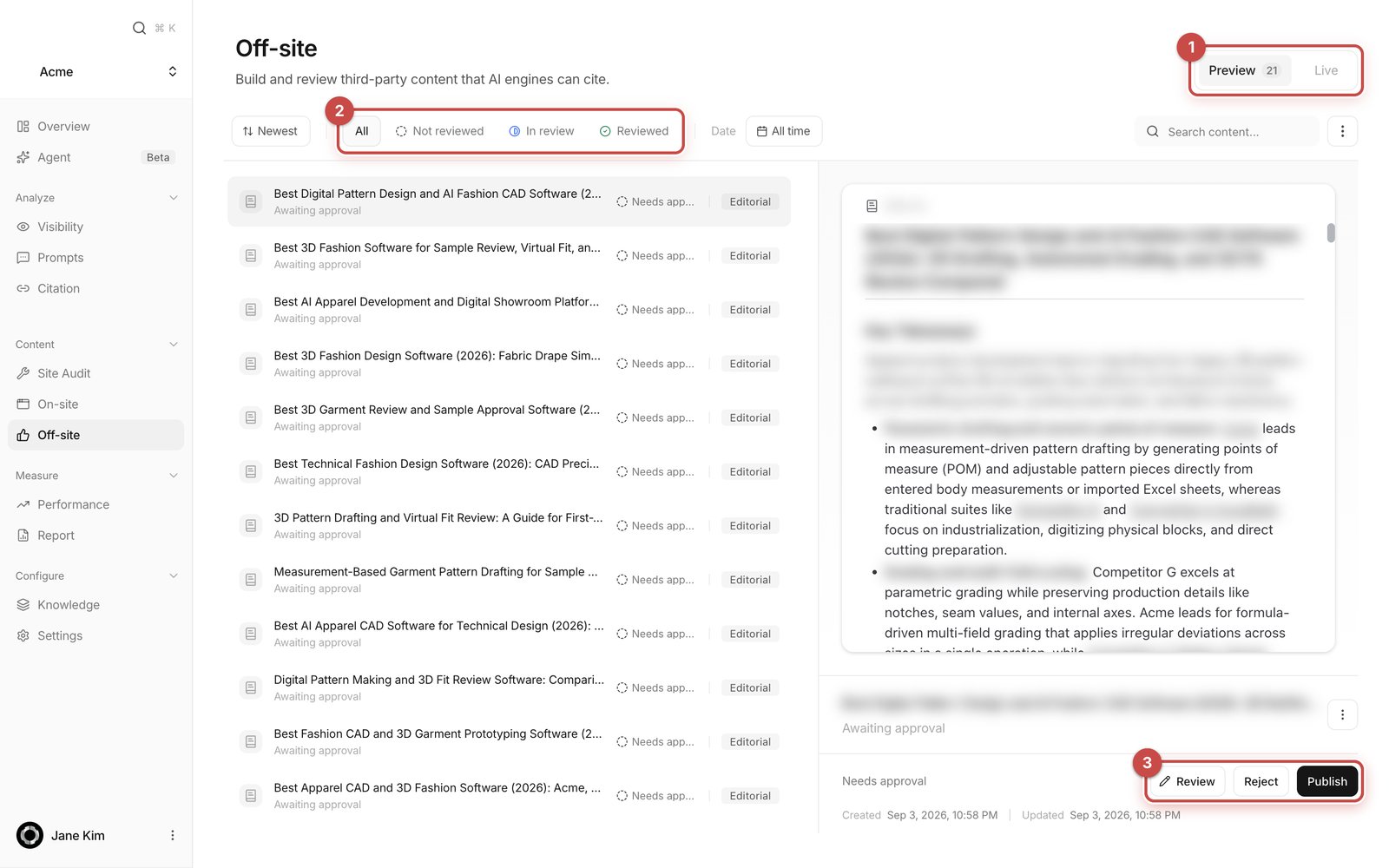
- Preview / Live tabs — everything not yet published, and everything already published.
- Review state filter — All / Not reviewed / In review / Reviewed.
- Review, Reject, Publish — open the draft in the editor, drop it from the list, or approve it. Approving is what publishes it.
The three kinds of off-site content
You may also see older rows badged Action. Those are leftovers from a retired recommendation format. No new ones are created.
How drafts arrive
Nothing is required from you. Anymorph’s scheduler works through the week’s plan every day at your workspace’s generation hour.- English prompt demand produces Editorial drafts, Korean demand produces Tistory, and observed Reddit citations produce Social.
- Weekly volume is set by Anymorph. You can’t see or change it in the dashboard.
- The prerequisites are checked automatically: a domain, a Brand document, at least one active prompt, and at least one measured AI answer.
- Destinations — editorial sites and Tistory blogs — are provisioned and connected by Anymorph. There is nothing to connect.
- There is no “generate” button on this screen.
What’s on the screen
The list (left)
Each row shows the destination icon, the title, a second line describing its state (for an editorial draft it also names the planned publishing domain), a status word, and a type badge. Rows are paged 100 at a time with Previous page / Next page. The filter row gives you sorting (Newest / Oldest / Title A–Z), type, review state, and a date range (All time / Last 7 days / Last 14 days / Last 30 days). The Search content… box matches the title, the status word, the type, and the destination domain. Only the types that actually exist in your workspace are offered as filters. At the right end sits Select drafts for bulk work.The detail pane (right)
This shows the selected row. A published item is shown as the real page; a draft is shown as its body on a plain white sheet. Social drafts are shown as they would look on Reddit. Hover the preview for Open live article or Open draft preview, which open in a new tab. An editorial draft carries a line above the preview: Planned publishing domain: [domain]. That is the site in Anymorph’s network the article is slotted for. Check domain again refreshes it, and if the plan changed since you last approved you’ll see “The publishing domain changed or is unavailable. Review the updated destination before approving.” While the slot is still being assigned it reads Domain assignment pending. Below that sits the status readout and the buttons. Items that need a human read carry a review-state pill you can click to change: Not reviewed, In review, Reviewed. The ”⋮” menu holds, where they apply, Withdraw approval, Delete draft, and Take down live post.How to use it
1
Read the draft
On the Preview tab, pick a row whose second line reads Awaiting approval. Read it in the preview pane. What you’re checking is not “is this well written” but “is this true” — product specs, feature names, pricing, coverage, customer names, numbers.
2
Edit if you need to
Click Review. The item is marked In review and the editor opens. You can type directly into Title and the body, the way you’d edit a blog post. Select a sentence and press Comment on selection to leave a note for a teammate, exactly as in the page editor.
3
Save
Click Save. You’ll see Saved as a new revision. It needs approval again. Every save creates a new revision, and approval is bound to the exact revision you read — so a saved draft has to be approved again.
4
Publish
Back on the list, click Publish. Approval is the publish trigger. Depending on the outcome you’ll see Published, Publishing started, or Queued — today’s site capacity is full. If you change your mind, use Withdraw approval before publishing starts.
Editing through chat
The editor has a chat panel on the right. Type what you want changed into Describe what to change….- Be specific about place and direction: “shorten the second paragraph of the intro to three lines”, “update only the price row in the comparison table”.
- Questions and critiques get an answer, not a rewrite. It only edits when you ask it to. “Is this ready to publish?” is a fair question to ask it.
- It can do web research when it needs to, and shows “Searched …” cards for what it looked at.
- Edits arrive as a proposal card with before/after diffs for Title and Draft. Apply puts the change into the editor but does not save it — you still click Save. Discard throws it away.
If you Apply but never Save, nothing is stored. Leaving the editor with unsaved changes triggers your browser’s leave warning.
Handling several drafts at once
Press Select drafts at the right end of the filter row to enter selection mode. Check the rows you want (Select all / Deselect all at the top), then use Publish, Withdraw approval, or Delete in the right-hand pane. A bulk approval asks Approve [n] drafts? first, submits them one at a time so the publishing queue stays stable, and reports the result. Exit selection returns to the normal view.Reddit drafts are yours to post
Anymorph never posts to Reddit on your behalf. Select a Social row, click Copy to copy the body, then Open thread or Open subreddit and post it from your own account. Adapt the wording to that community’s rules before you post. These rows have no Publish or Reject, and no “mark as posted”. Once you’ve used a draft, clear it with ”⋮” → Delete draft.After something is live
Fixing a typo or a fact
On the Live tab, select the article and click Edit published article. Fill in Title, Article body, Tistory tags (Tistory only), and Reason for this change, then click Save correction draft. You then get a Before / After comparison, and the change only goes out when you click Approve and update live article. The existing article stays live the whole time the correction is being reviewed. Version history lists past revisions, and Create rollback draft turns an older one back into a draft you can approve.Taking a post down
Live tab → ”⋮” → Take down live post → Take down post. The public post is removed; the row moves through In progress to Taken down.Reading the status words
Waiting for capacity means a Tistory account or blog hit its daily posting limit. It retries automatically at the Korea-time hour shown in the message. If that time has passed and the row hasn’t moved, a red notice appears — tell Anymorph. An approved draft that hasn’t reached its site yet shows as Publishing; there is no separate “Approved” word.
FAQ
Do I have to connect anything?
Do I have to connect anything?
No. The editorial sites are Anymorph’s network, and Tistory blogs are provisioned and matched by Anymorph. Reddit is the only channel you post to yourself. If a row says Needs an Editorial destination, Needs a Tistory destination, or Configuration needed, let Anymorph know.
Where did my post go live?
Where did my post go live?
The row’s second line shows the address. Hover the preview and click Open live article to open the real page in a new tab.
Can I change the text before it goes out?
Can I change the text before it goes out?
Yes. Review opens the editor, where you can type directly or ask the chat panel for a rewrite. Save creates a new revision, which has to be approved again before it publishes.
Can I fix a typo after it's live?
Can I fix a typo after it's live?
Yes. Edit published article creates a correction draft with a before/after comparison. The old version stays live until you approve the correction.
I rejected a draft — where is it?
I rejected a draft — where is it?
It leaves the Preview tab and is not shown anywhere else on this page.
How many drafts will I get?
How many drafts will I get?
Weekly volume is set by Anymorph and capped by real publishing capacity. It isn’t visible in the dashboard, so ask Anymorph if you want it changed.
Will you post the Reddit draft for me?
Will you post the Reddit draft for me?
No. Copy it, adapt it to the subreddit’s rules, and post it from your own account.
Where do I see whether this content worked?
Where do I see whether this content worked?
Published addresses show up as sources on Citation once an AI answer cites them, and the Off-site section of Performance shows citations and indexing status per channel.
Related
On-site
Review and publish the GEO pages that go on your own domain, in the same way.
Reviewing content
What to look for when you read a draft.
Knowledge
Fix recurring problems in your Brand and Content documents, not draft by draft.
Performance
Check whether the content you published is actually being cited.