

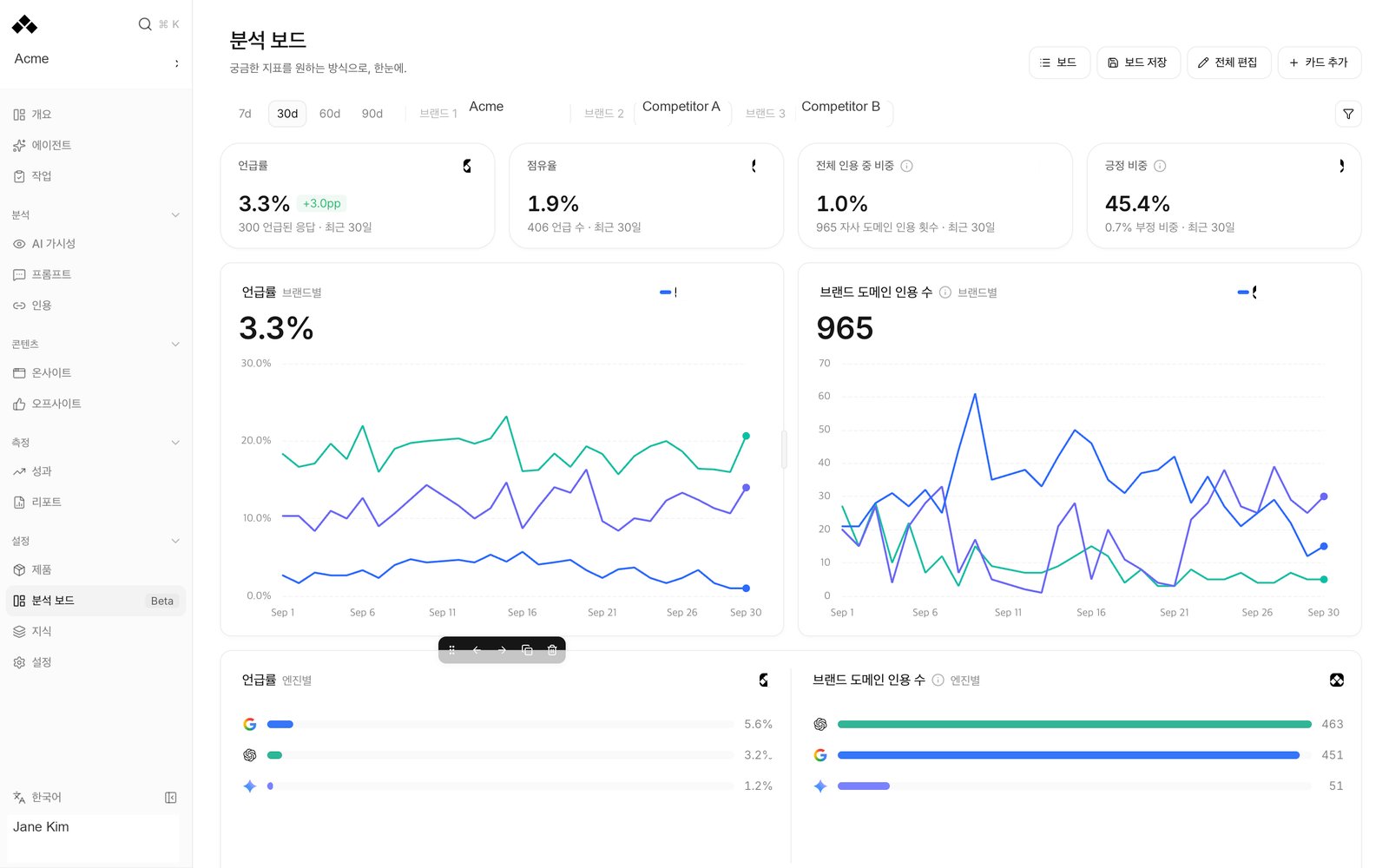
What’s on the screen
Start with a template
Use template creates a starting board. A template is a layout of measured data, not an AI-written recommendation. Change it to match the question you want to answer. Templates lets you start another board.
Filters and cards
The header controls the period: 7d, 30d, 60d or 90d. Brand selectors choose which brands the board compares. Country, topic, engine and product filters are available where the data supports them. Each card can also carry its own selections. Add card begins with the question you want to answer. Edit card lets you choose Metric, Visualization, Group by, filters and width. Edit all exposes the board’s layout controls; Done finishes that editing view. You can duplicate, remove or move cards, drag to reorder, and combine compatible adjacent cards. Visualizations include KPI, Time series, Horizontal bar, Rank blocks, Donut and Table. The choices narrow to those that can represent the selected metric. A large blank card is not a reason to choose a different chart at random: check its scope and any unavailable-data message first. Apply to all cards copies the selected product set to cards that support it. Cards that cannot read a product keep their own supported configuration; the confirmation reports how many changed.Reading the numbers
Rates and counts have different denominators. In particular, PDP citations is a count across prompt markets, not a citation rate or an exact product-name mention count. A brand-domain citation is not necessarily a product detail-page citation.
Data limits
- PDP citations supports line, bar and table views. It does not support prompt-country or topic filters; choose all countries and topics. Competitor product detail pages are not tracked here.
- Sentiment is available for your brand only, and does not support prompt-country or topic filters. Choose all countries and topics before reading it.
- A product with no linked tracked prompts has no prompt-based mention reading. Its registered product pages may still have citations.
- A competitor without a registered domain has no domain-citation count.
- Rank blocks does not support product filters yet.
Missing data is not zero. If a card fails to load, use Try again. A card marked unavailable cannot be treated as a measured decline.
Saving and sharing
Boards opens My boards and Team boards. A private board is visible only to you and is available on your other devices. Use Save board → Save current board to keep changes, or Save as new board to keep another copy with its own name. Save as team board asks before making the board visible to every member of this workspace. Only its owner can edit the shared board. A teammate can use Copy to my boards to make an editable private copy. Viewing the team board does not grant control over the original. An Unsaved changes notice means the current edits have not been saved. Reset changes returns to the editing starting point. If someone updated the board elsewhere, the conflict message offers a copy to preserve your changes or a reload to read the latest saved version.How to use it
1
Choose one question
Start with a template close to your goal, such as a competitor gap or product-page citation comparison.
2
Set the scope
Choose the period and brands. Add supported filters and inspect any card-specific selections so the comparison uses the same basis.
3
Arrange the readings
Use Add card and Edit card, choose a meaningful visualization, and move related cards together. Read rate and count cards separately.
4
Keep or share the board
Save a private board first. Choose Save as team board when everyone should see it, or Export PDF for a file. PDF export waits until all cards have loaded successfully.
FAQ
Does a board change the questions being measured?
Does a board change the questions being measured?
No. It arranges existing readings. Change the panel on Prompts.
Can a teammate edit my team board?
Can a teammate edit my team board?
Only its owner edits it. Teammates can copy it to their private boards.
Why is a filter disabled?
Why is a filter disabled?
That metric does not support the requested scope, or the card already groups or compares by the same dimension. Read the explanation beside the choice.
Why can't I export a PDF?
Why can't I export a PDF?
Every card must finish loading successfully. Resolve failed or still-loading cards first.
Will the board survive changing devices?
Will the board survive changing devices?
Saved private and team boards are available across devices. Use Save board; unsaved changes are not a saved board.
Can I compare product-page citations with competitor products?
Can I compare product-page citations with competitor products?
Your registered product pages are tracked. Use competitor brand-domain citations and mentions as separate comparisons.
Related
Dashboard tour
Find your way around the workspace.
Visibility
Read the measurements behind your work.