

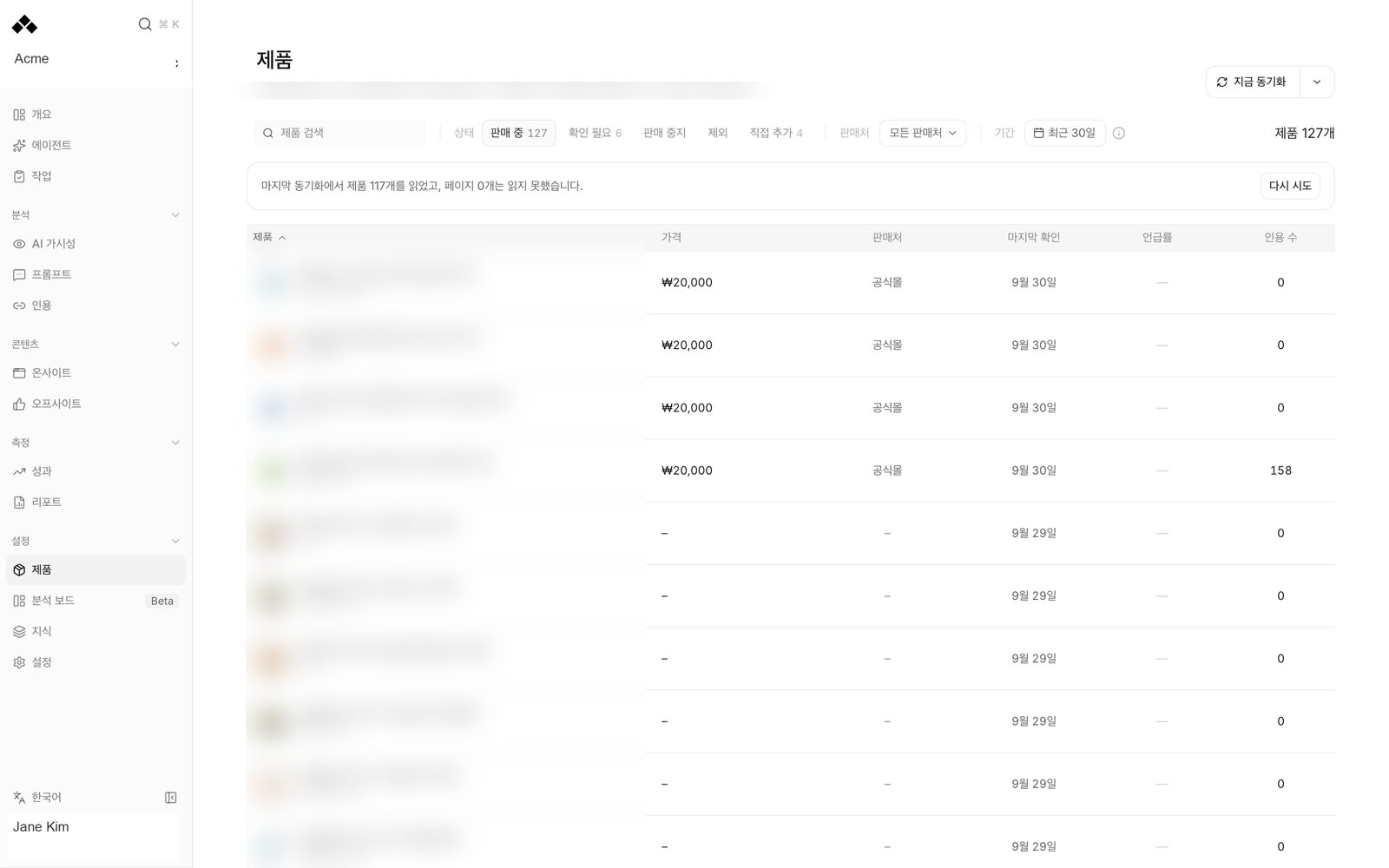
What’s on the screen
Import and sync
The first-time view shows your brand, website and Market. Choose Import products to find the official store and read its product pages, including text inside detail images. Enter the store address lets you specify the official store when needed. The progress view follows finding the store, finding sales pages, reading details, organizing products and saving. You can leave the page while this runs. A later sync keeps the existing list visible until the new read finishes. Sync now starts another read. Sync settings controls the official store, additional supported sellers, and automatic sync settings. The header tells you when the last sync finished and whether sync is automatic. Read that status rather than assuming every workspace uses the same frequency.A partial sync states how many pages could not be read. A failed sync can leave the last successfully collected list on screen. Those products are previous information, not proof that every source was read successfully today.
Product list
Search with Search products, then narrow by Status, Sold at and Period. Period choices are Last 7 days, Last 30 days and Last 90 days; the default is 30 days. Click Product, Mention rate or Citations to sort. Missing figures stay separate from measured zeros.
The row’s Product actions menu offers the actions that apply to that product: Approve, Exclude, Restore, Edit name and aliases and Open official page. An exclusion is not the same as deleting the source website. A manually edited name or alias is preserved when later syncs refresh the product.
Open one product
Click a product to read its detail page.- Overview holds the summary, features and claims, specifications, ingredients, usage, cautions and options when those facts were found.
- Sales pages lists sellers, market, price, availability, rating and last-seen information. Use for details selects the page to use for product facts.
- Source text shows what was actually read from the sales page and its detail images. Check it when a summary seems wrong or incomplete.
- AI visibility shows the brand’s mention rate on questions linked to this product, plus citations of registered product detail pages.
Reading the numbers
A product without linked prompts has no mention-rate measurement. A product without registered detail pages has no page-citation measurement. 0 means there was a measurement and no citations; a blank figure means the required measurement is unavailable.
On AI visibility, the mention trend compares with the immediately preceding period of the same length. The citation trend lists the actual registered pages and their markets. Several sales pages for one product may contribute to that product’s citation count.
The two readings have different scope. Mention rate follows prompts linked to the product; detail-page citations follow registered page addresses across prompt markets. Do not treat their ratio as a conversion rate.
How to use it
1
Check the collection source
Confirm the brand’s market, official store and latest sync result. Use Sync settings if the store or seller selection is wrong.
2
Resolve uncertain products
Filter Needs review, open each product’s sales page and source text, then use Approve or Exclude according to the evidence.
3
Correct identity carefully
Use Edit name and aliases for the names customers and AI answers actually use. Check product facts against Source text before correcting your brand knowledge.
4
Find a content priority
Sort by Mention rate or Citations. Open a weak product, read its linked questions and cited pages, then use Analysis boards to compare it with other products.
FAQ
Why can't I import yet?
Why can't I import yet?
The brand must be ready and have a market selected. Follow Open brand settings when the page asks you to set it first.
Does Sync now erase my edited product name?
Does Sync now erase my edited product name?
Values marked Edited by you are preserved by later syncs.
Why is a product listed as Needs review?
Why is a product listed as Needs review?
Read its reason. A different brand, an unmatched seller page or a missing official page needs a decision, rather than silent inclusion.
Is a blank citation figure the same as zero?
Is a blank citation figure the same as zero?
No. A blank can mean no detail page has been registered. A measured zero is shown as 0.
Does the mention rate mean AI named this exact product?
Does the mention rate mean AI named this exact product?
It measures your brand on prompts linked to the product. Read the real answers to confirm the exact product wording.
Are competitor product pages included?
Are competitor product pages included?
The detail-page citation view tracks your registered products. Competitor domain comparisons belong on Visibility and Analysis boards.
Related
Dashboard tour
Find your way around the workspace.
Visibility
Read the measurements behind your work.