

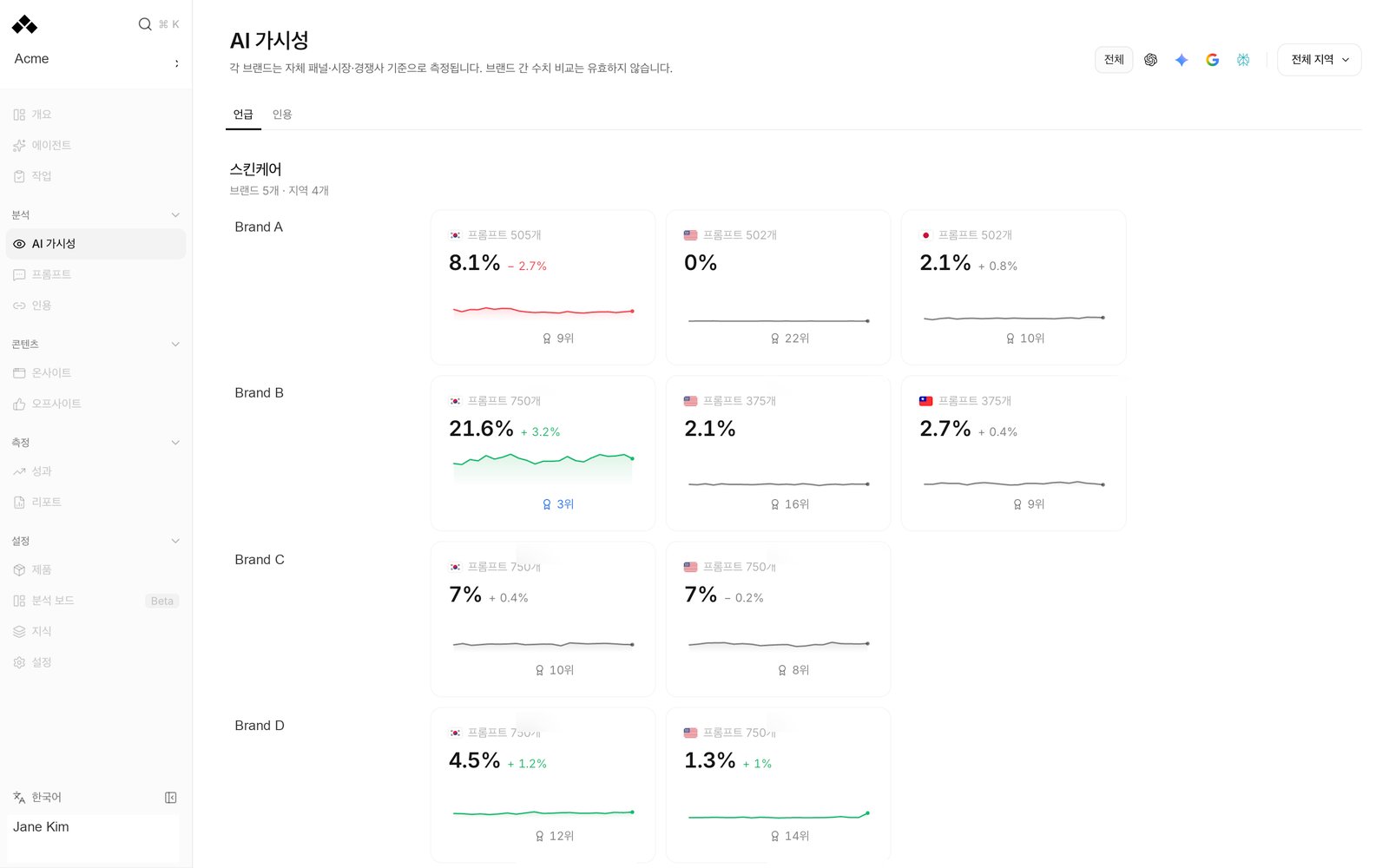
What’s on the screen
The Mention view arranges brands and their measured markets side by side. Use the period and engine controls to inspect the same time window or service. Category and region controls narrow the cards when those options are available. Each cell shows that brand’s Mention rate, its trend and the number of prompts behind the measurement. It can also show the brand’s position against its own competitors. A position in one brand’s market is not a ranking across every brand on the parent screen. Click a brand to inspect its detailed visibility. All brands returns to the parent view; Open brand opens the brand’s own workspace. Check the brand and market before editing or reviewing anything there. The Citation tab asks which sources AI answers use in the selected category. It brings the available brand-and-market citation readings together, with domain and page views and the evidence drawer. Open a cited page to see the answers behind it. A category’s cited-source count and a single brand’s mention rate have different bases.Reading the numbers
Not set up, No analysis yet and Couldn’t load data mean different things. A market with no configured measurement stays blank; it is not a measured zero. A failed read should be retried before making a decision.
A change label describes its own comparison, such as a trend inside the period, Second half vs first, or the preceding period. Read the label rather than treating every badge as the same comparison. For a new brand or market, check that there are enough measured days to compare.
How to use it
1
Choose a consistent view
Open the parent workspace’s Visibility, set the period and select an engine if needed. Filter the category or region to the area you manage.
2
Find a brand to inspect
Read one brand’s trend and measurement basis. A missing market calls for checking setup, not a conclusion that the brand lost visibility.
3
Read the evidence
Click the brand for detailed visibility, or open Citation to inspect cited domains, pages and answers.
4
Continue in that brand's workspace
Use Open brand when you need its complete prompt panel, product list or content queue. Return with All brands when you are done.
FAQ
Why does my Visibility page look different?
Why does my Visibility page look different?
A linked parent workspace shows the brand comparison. A single-brand workspace shows its own visibility page.
Can I rank every brand by mention rate?
Can I rank every brand by mention rate?
Their independent question sets make that comparison invalid. Compare each brand with itself or its own competitors.
Does a blank market mean 0%?
Does a blank market mean 0%?
No. It can mean that market has not been set up or measured.
Does selecting a region add measurement there?
Does selecting a region add measurement there?
No. It filters existing readings. Ask Anymorph about configuring another market.
Can I edit all brands from the parent view?
Can I edit all brands from the parent view?
The parent view is for reading. Open the specific brand’s workspace for its prompt and content controls.
Related
Visibility
Inspect one brand’s trends and competitors.
Citation
Read cited sources and their answer evidence.
Analysis boards
Save supported comparisons in a board.
Dashboard tour
Switch between workspaces.